





lumindor
Members
-
Joined
-
Last visited
Everything posted by lumindor
-
Hey buddy could I get a trial on this? Thanks
-
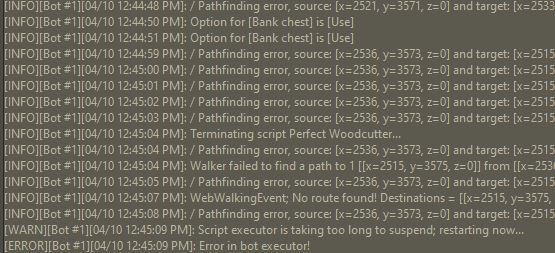
Hey Sorry to be a pain, I've tried all 3 Walkers, gives similar error logs. Occurs after banking and becomes stuck on the bank inventory screen. Using Osbot version: 2.4.118 Is this isolated to me only? Cheers bud
-
Hey, I changed locations to see if it was causing this on other places, I was attempting to do Willows at Barbarian Outpost. Started at the willows it managed fine, then went to bank the logs (went good), then after putting the inventory into the bank it stops and just stays on the bank interface with the Console errors above.
-
I sure did, tried all 3 walking systems but it shows as attached,
-
Hey Thanks for the script, just bought it. Just having issues with the web-walking system, I have tried all 3 systems and the log shows No route found (trying to get to Teaks at Castle Wars) Any ideas? Cheers
-
Hey any chance to have like a configuration where you can use pouches on basic settings. Was doing fire runes but the only options were to use the Advanced which had Ring of Dueling method only, but I didn't want to use that one. Just a query, still love this though will purchase regardless Thanks
-
Hey Bro Love your scripts have bought a few of them, could I request a trial on Perfect Runecrafting? Wanting to purchase it soon. Cheers
-
Hey Khal Big fan of your scripts just got the Winterodt one, could I request a trial on this please? Thanks Bud
-
Can confirm, seems like the mapping/walking system changed with the OSRS update. Jagex must of changed something big
-
Can I get a trial please ;)



