Jump to content
View in the app

A better way to browse. Learn more.

OSBot :: 2007 OSRS Botting

A full-screen app on your home screen with push notifications, badges and more.

To install this app on iOS and iPadOS
  1. Tap the Share icon in Safari
  2. Scroll the menu and tap Add to Home Screen.
  3. Tap Add in the top-right corner.
To install this app on Android
  1. Tap the 3-dot menu (⋮) in the top-right corner of the browser.
  2. Tap Add to Home screen or Install app.
  3. Confirm by tapping Install.

rowhan

Members
  • Joined

  • Last visited

  1. rowhan replied to sarsi96's topic in Requests
    99 atk/str/def/hp, 90 range, 93mage. Fcape Nothing else, Interested?
  2. rowhan replied to rowhan's topic in Accounts
    yeah unless noone bids higher.
  3. rowhan replied to rowhan's topic in Accounts
    Bump
  4. rowhan replied to rowhan's topic in Accounts
    bump
  5. rowhan replied to rowhan's topic in Accounts
    bump
  6. rowhan replied to rowhan's topic in Accounts
    bump
  7. rowhan posted a topic in Accounts
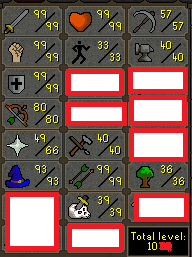
    Selling my level 122 since I'm not playing on it, and I havn't been playing on it for the last 8~ ish months. I'm the one and only owner and the account is created on a throw-away Email so you get the email associated with the account with the purchase. Startbid: 80M A/W: 200M Accepting Ingamegold or BTC.
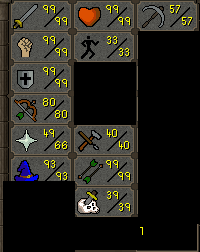
  8. Sup, got an old acc I'm not using anymore which I'd like to know the value of. No bans, pretty much no quests done, 20M in items, firecape, nothing else.
  9. oooooooooooooooooooooooo
  10. Yeah edited my first post.
  11. Hi, how much is my WCer/Starter pure worth? 1 botbust 1 year ago. Thanks.
  12. https://www.humblebundle.com/weekly PLZ son.
  13. 99 WCer with pretty much 1 in everything else?
  14. rowhan replied to idntbot's topic in Spam/Off Topic
    42
  15. Lol, u r a peasant. I know much more about training and dieting than you do. Get good son You sure do, that's why you came up with counterarguments to what I just said. Oh wait, you know nothing:|

Account

Navigation

Search

Configure browser push notifications

Chrome (Android)
  1. Tap the lock icon next to the address bar.
  2. Tap Permissions → Notifications.
  3. Adjust your preference.
Chrome (Desktop)
  1. Click the padlock icon in the address bar.
  2. Select Site settings.
  3. Find Notifications and adjust your preference.