




Jump to content
View in the app

A better way to browse. Learn more.

OSBot :: 2007 OSRS Botting

A full-screen app on your home screen with push notifications, badges and more.

To install this app on iOS and iPadOS
  1. Tap the Share icon in Safari
  2. Scroll the menu and tap Add to Home Screen.
  3. Tap Add in the top-right corner.
To install this app on Android
  1. Tap the 3-dot menu (⋮) in the top-right corner of the browser.
  2. Tap Add to Home screen or Install app.
  3. Confirm by tapping Install.

chunyonggg

Members
  • Joined

  • Last visited

Everything posted by chunyonggg

  1. Yes I tried that, I meant your GUI settings for the script.
  2. Could you post your GUI settings? Also, I am unable to set reaction time to be exactly 50ms as it's not a text input but set it before the first marker so it should be ~100ms at max. Am I doing it right?
  3. Are there any updated guides? I tried wine on Linux Mint but didn't work too and gave up, didn't know it was a possibility.
  4. I'm getting very low exp rates on mirror mode. The screenshot below is after 1h of runtime. Any tips? Using jugs of wine without fletching on
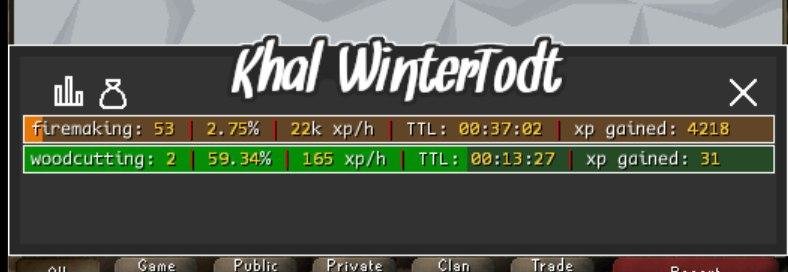
  5. Hi there, could I have a trial for the AIO Cooker
  6. Casting curse on Monk of zamorak in varrock palace does not work. It casts once and stops doing anything else. @Czar

Account

Navigation

Search

Configure browser push notifications

Chrome (Android)
  1. Tap the lock icon next to the address bar.
  2. Tap Permissions → Notifications.
  3. Adjust your preference.
Chrome (Desktop)
  1. Click the padlock icon in the address bar.
  2. Select Site settings.
  3. Find Notifications and adjust your preference.