Dipchips
Members
-
Joined
-
Last visited
Everything posted by Dipchips
-
i dont know about 1 and 3 but for your second question osbot has a break handler click on settings on the top right then on options and then breaks enabled.
-
can i get trail for perfect woodcutter pls
-
-
when the brutal black drag plugin banks for a new trip and it goes back and its out of pray it just stand still and hovers over the prot magic pray is it possible that before it goes in again it refulls prayer at the altar?
-
trail pls
-
ye u only pay once
-
after the new update i still get the same problem with the brutal black drags plugins that when it tries to hop it doesnt hop but it crashes the client maybe im doing something wrong but i dont know what. and is it possible that it tries to hop after the kill cause now when it wants to hop cause of the amout of players it just hops with the dragon almost dead.

-
if u start the script on the top left it says plugins click on that and then click on sand crabs
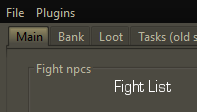
-
i think after sometime it does but not instandly
-
when i use the brutal black drags plugin and it tries hopping it crashes and it says this
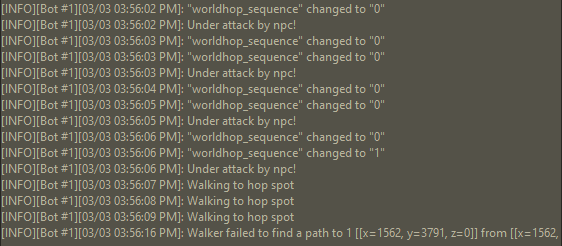
-
u did like my post but i dindt get my trail
-
could i get a trail pls
-
can i pls get a new trail i couldnt test everything because of osbot being down yesterday :3
-
can i have a trail pls
-
can i get a trail pls
-
trail for perfect fighter pls
-