
Reveance
Members
-
Joined
-
Last visited
Everything posted by Reveance
-
Actually, I think I've seen a message when the overload wears off: "The effects of overload have worn off, and you feel normal again." :p. That would actually be the best thing to do; implement a MessageListener in your script and register when the overload has worn off using that message
-
I know it's not hard to implement...but it's a premium script in the store...not a private script unfortunately :P the main thing is that I'd want to be able to run said script and when it's done run another...a plus woud be to be able send game data to my server so I can implement some fail safes if something happens EDIT: for example, if login screen detected -> alert me
-
-
-
Yes I agree with everything said but everything said only applies to custom scripts...I've bought a couple of scripts and would like to run a script of my own aside of those that would monitor some game data and send it back to my server. It would also allow me to automate more stuff easily
-
I was wondering if it's possible to control a Script class from within a custom script. Ive seen the scriptexecutor instance and it has the methods required but I don't see how I can get access to the users available scripts and even if that were the case I think the scriptexecutor will terminate the script that is currently running to start the new one, no?
-
It think it would be best to script taking an overload at a specific value (51 for example, or maybe a range. e.g. 51-53) and then in the part after where you drink the overload put a ConditionalSleep which basically sleeps until your condition is true. So make your condition health >= 1 && health <= 3, for example. That would make the drink absorption part wait until you reached your desired health by absorption. Don't forget to call sleep, use it like this: new ConditionalSleep(10000) { //max amount of sleep in constructor //override condition() here }.sleep(); Otherwise, if you need to do stuff while the health is being dropped (so you can't afford a wait) you would be better of using a timer and then checking the conditions of the timer and health in your guzzle part. Edit: Also, you should post this in Scripting Help
-
public int getCurrentAbsorption() { RS2Widget widget = r.widgets.get(202, 1, 9); if(widget == null || !widget.isVisible() || widget.getMessage().isEmpty()) return 0; return Integer.parseInt(widget.getMessage()); } Just made this anyways :P
-
They can yes. They can at least detect if it's a modified client apparently, unless you're using mirror mode of OSBot. No, because there are other modified clients that are allowed (OSBuddy). But I suppose they may track you a little bit faster, not sure though as there are A LOT of people using OSBuddy..
-
That could be, but I didn't hear of it before and it might make some people here realize this too. For me personally I randomize a lot because it's pretty much the next best thing I can do right now since the bot never misses a click on anything. But yeah obviously not everything should be randomized...all people have habits but there's always randomness involved tho.
-
-
Thank you for all the distributions, I'll look into them. I didn't know that Jagex doesn't collect mouse data anymore, however this isn't necessarily only mouse data. The actions that are executed on the server (in this case for example alching) would still get executed with roughly the same timings, with some random delay due to the connection. You don't think that that is somehow involved in their antibot system? It seems silly to throw something like that away because it's easy to counter. Machine learning is interesting stuff yeah, would someday like to dive into that when I've got lots of spare time :'D
-
Well apparently a lot of scripts haven't implemented this as I hadn't yet seen any script that did yet. Like I said the reason for posting this is that it may help improve some scripts. Even if bots have this implemented, what use is it if it's not being used by the main thing the bots do - run scripts. But gz on commenting even more 'useless shit'. I collected 500 clicks, and filtered out the non existent values since there were still way too many 0's. But you can see some kind of shape :p
.png.5da9804cdfa9e5582c93a68f559b9bea.png)
-
Good idea! I already have something like this set up so will get to this now, it might be biased a little bit though since I'm gonna be paying attention to how I click. I think ultimately it would be best to let your clicks be randomized out of a collection of mouse click intervals created by yourself.
-
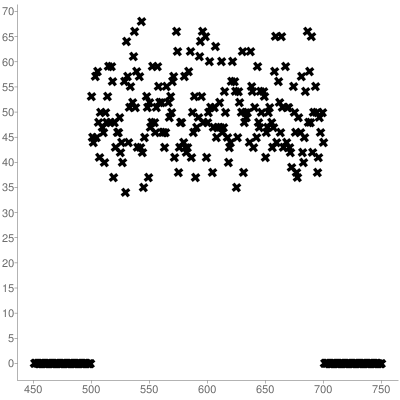
This post is mostly intented for scripters I suppose. So anways I just started scripting again after a long break, and thought of the following while making my script: If Jagex can monitor mouse movements, what would be the easiest way to detect bots? For instance take magic; high alching. Thinking about making a script like that I'm sure I would have used sleep(random(min, max)) between mouse clicks until now. Let's take sleep(random(500, 700)) and see what Jagex would see if they're monitoring the time between the clicks for let's say 10k alchs, by using this snippet: int[] numbers = new int[750]; for (int i = 0; i < 10000; i++) { numbers[MethodProvider.random(500, 700) - 1]++; } int i = 0; for (int n : numbers) { if (i++ < 450) { continue; } System.out.println("" + i + ", " + n + ""); } Entering the output in a scatter plot produces the following data visualisation: I'm sure that you would realize that no human could ever hit so perfectly random between 500 and 700, but never go below or past those respectively. So I started digging into this and found out there is a common method which is used for this sort of thing, called standard deviation. It turns out that OSBot already has this in their API at MethodProvider#gRandom, so you can already use this. I had already made my own snippet for it though: public static void main(String[] args) { int[] numbers = new int[750]; for (int i = 0; i < 10000; i++) { numbers[rand(500, 700) - 1]++; } int i = 0; for (int n : numbers) { if (i++ < 450) { continue; } System.out.println("" + i + ", " + n + ""); } } public static int rand(int min, int max) { return rand(min, max, (max - min) / 8); } public static int rand(int min, int max, int deviation) { Random r = new Random(); int avg = min + ((max - min) / 2); int rand; do { double val = r.nextGaussian() * deviation + avg; rand = (int) Math.round(val); } while (rand < min || rand > max); return rand; } Now, running the output data through the same scatter plot produces the following image: Which doesn't drop off to zero without ever hitting one past it. It is important to note that when using this, you might want to make your intervals wider...it is kinda unlikely that you'd be as accurate as the above plot. For example 300, 900 produces this, which is what I think would be a lot more human like: Anyways, you do not always need to use this but I strongly recommend it for scripts that use repetitive clicking and such, because it seems very easy to detect botters from Jagex's side if you use regular sleeps in some cases. Thought I'd share since I had never seen sleep used with such a random distribution before and it may prevent some bans Goodluck & hf :p
.png.87a9d47c58b8170ce7e82ecefbda2a2a.png)
.png.f3a84a1b61b3e242dcf8349f0fda424e.png)
-
Are you sure? If you look in the logger, which hooks are being loaded for your client revision? I think the broken ones were revision 136. I'm since I posted my latest reply loading hooks for client revision 137, which is working for me now..
-
I think it has been fixed now
-
Hey, just restarted the client and received the error 'An error has occured while loading hooks'. Here's the log:
-
Wow seriously... :'D ok I'm guilty now too. Sorry Dust, GL
-
Thanks, will keep it in mind!
-
Alright good to know, thanks!
-
Hahah yeah obviously, I'm going to make it people's choice anyways ... so they can turn it off but was wondering if osbot had policies regarding not doing certain stuff in your script or smth. But I guess I'll be fine then :P
-
Hey, I'm seeing some scripts that are using the scripts information to send to a website of the developer for debug or info purposes. I was wondering if there's a policy on it or something as I plan on doing this and obviously I don't want to create all that stuff if it's not allowed and then remove it. Currently I'm just practicing the API a little bit but I do want to create scripts for the SDN in the near future. Thanks to anyone that can point me in the right direction
-
-