-
email about rwt
No, they'll not. Only into your account mailbox on the Runescape Website
-
GIVEAWAY WINNER!!
Probably the only thing I ever won in my life lol
- Can't launch
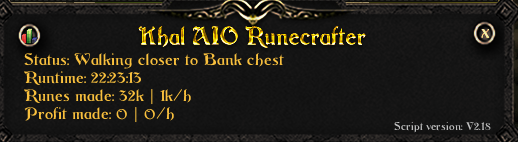
- Khal AIO RuneCrafter
-
Zerker giveaway
- Oh crap, I'm definitely getting banned
They can track trades.- Less bans lately?
I have been going strong since 5 days in F2P.- [RS3] Lvl 138 - 2548 Total lvl - Lots of items in bank
They must have the following criteria in their thread: 1. Pictures of the account stats 2. Pictures of the login details 3. Pictures of the total wealth (if there is any) 4. Pictures of the quests completed 5. The price you will be starting bids at: 35M 07 6. The A/W (Auto-win) for your account: N/A 7. The methods of payment you are accepting: 07 Gold 8. Your trading conditions: You go first unless you are trusted. M/M if you want. 9. Pictures of the account status 10. Original/previous owners AND Original Email Address: I am the original owner. I don't have personally any written recoveries but I have all personal information to get it and it will be giving while trading it.- Did i fuck up?
- TWC?
You should look into the dispute section, you may find your name in it soon enough, otherwise request why in there, I guess- 2 day ban. What to do?
If you keep botting on it.. Well... It won't get long until Sadly, if you don't plan on playing legit on it, like said @@drapi, you should think about selling the account.- Anyone get banned the last couple of days?
Caption this picture LOOOLOLOLOLOLOLOL- Anyone get banned the last couple of days?
I got mine on a combat bot- Chance of being banned
You will not be ban for using an auto-typer, but muted, yes. Still, good idea.- Selling Main account/Decent skills/2 99s
No, closed, sorry. - Oh crap, I'm definitely getting banned
Account
Navigation
Search
Configure browser push notifications
Chrome (Android)
- Tap the lock icon next to the address bar.
- Tap Permissions → Notifications.
- Adjust your preference.
Chrome (Desktop)
- Click the padlock icon in the address bar.
- Select Site settings.
- Find Notifications and adjust your preference.
Safari (iOS 16.4+)
- Ensure the site is installed via Add to Home Screen.
- Open Settings App → Notifications.
- Find your app name and adjust your preference.
Safari (macOS)
- Go to Safari → Preferences.
- Click the Websites tab.
- Select Notifications in the sidebar.
- Find this website and adjust your preference.
Edge (Android)
- Tap the lock icon next to the address bar.
- Tap Permissions.
- Find Notifications and adjust your preference.
Edge (Desktop)
- Click the padlock icon in the address bar.
- Click Permissions for this site.
- Find Notifications and adjust your preference.
Firefox (Android)
- Go to Settings → Site permissions.
- Tap Notifications.
- Find this site in the list and adjust your preference.
Firefox (Desktop)
- Open Firefox Settings.
- Search for Notifications.
- Find this site in the list and adjust your preference.