





RDM
$100.00 Donor
-
Joined
-
Last visited
Everything posted by RDM
-
I plan to do BS so i can use them for fletching. Gotta think ahead not to waste any xp/time Iv'e been wanting to make one for the last year but didn't think I would enjoy it since It's just like any other account I've made, but I'm really enjoying it so far. It almost feels like a whole new game or even playing rs for the first time ever like back in 04 when I started
-
27 crafting? that's nothing
-
So I made an ironman this morning that I'm only going to play legit on and got my first random. Dueling rings sorted.
-
Didn't know what an "e-skater" was till I googled it and that looks lazy af. Iv'e been longboarding for close to 10 years and I will never try one of those things.
-
Changed the name and it worked, weird. This was my first try in a few weeks
-
Anyone else getting this when creating an account?
-
Bump
-
Bump
-
Bump
-
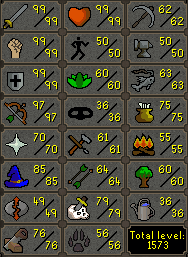
Now with 99 Defence!BumpBumpBumpBump110m bid via pmBumpbumpdad is famous1. Pictures of the account stats (picture below) 2. Pictures of the login details 3. Pictures of the total wealth (if there is any) none 4. Pictures of the quests completed: 111qp 5. The price you will be starting bids at: 100M 6. The A/W (Auto-win) for your account: 320m 7. The methods of payment you are accepting: rsgp 8. Your trading conditions: You will go first or vmm 9. Pictures of the account status 10. Original/previous owners AND Original Email Address: I am the OO and creator of this account
 only in Make it rainalso, deadman mode is now clanmanmode because its only clans. This is so boring to watch, even the people who didn't get kicked



