





Leaderboard
-
froster666
Members1Points43Posts -

Czar
Global Moderator1Points23714Posts -
invalidargvm2ntz
Members1Points9Posts -
Theangelito
Members1Points12Posts


Popular Content
Showing content with the highest reputation on 12/17/25 in all areas
-
1 pointBrought to you by the #1 most sold script series on the market. Come and see why everyone's choosing Czar Scripts! This is the most advanced Agility bot you will find anywhere. BUY NOW $9.99 NEW! Added Both Wyrm Courses! SCRIPT INSTRUCTIONS Optimal Setup for the bot: Please set the mouse zoom to far away (to the left, like below) so that more obstacles can be seen in the view, and so the script can be more stable and reliable Also, make sure to have roofs toggled off (either go to settings tab or type ::toggleroof) for optimal results1 point
-
1 pointHey, as always looks great! wondered if i could get a trial to try it out? if not thats fine too1 point
-
Gn, can i test construction please1 point
-
1 pointKeeps saying inventory is incorrect every single time i try and run the bot. I havent gotten it to work a single time...1 point
-
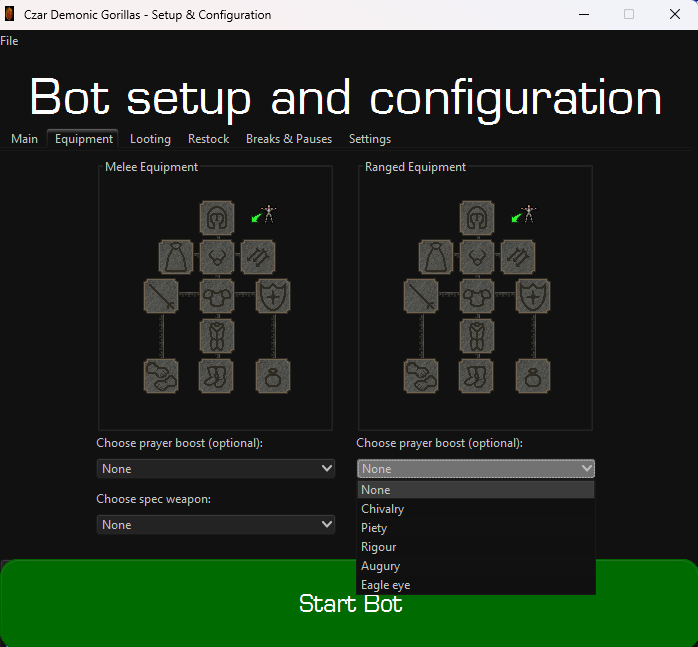
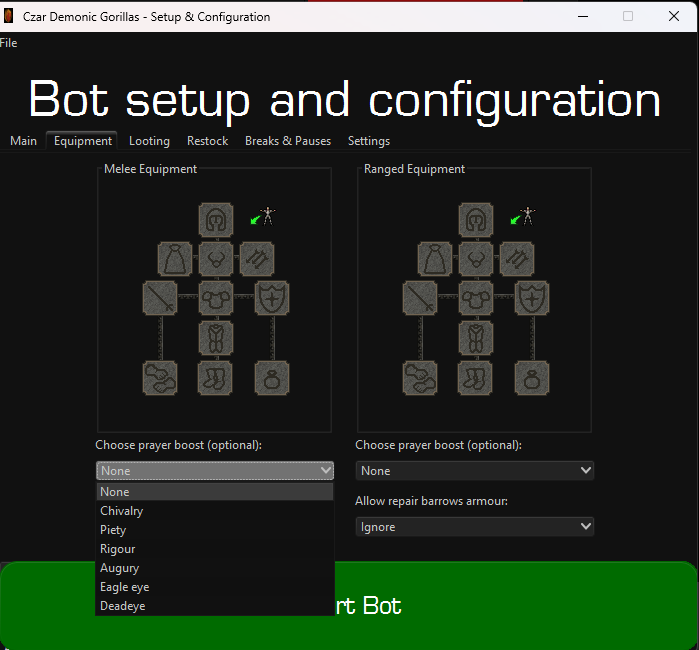
1 pointHey man, checking I see Deadeye on the melee pray option but the 2nd range setup theres no option for deadeye.
 1 point
