



Jump to content
View in the app

A better way to browse. Learn more.

OSBot :: 2007 OSRS Botting

A full-screen app on your home screen with push notifications, badges and more.

To install this app on iOS and iPadOS
  1. Tap the Share icon in Safari
  2. Scroll the menu and tap Add to Home Screen.
  3. Tap Add in the top-right corner.
To install this app on Android
  1. Tap the 3-dot menu (⋮) in the top-right corner of the browser.
  2. Tap Add to Home screen or Install app.
  3. Confirm by tapping Install.

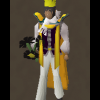
My Skiller Progress :D (Updated 10-12-2013) No Longer Banned :)
What should I level up next? 45 members have voted

  1. 1. What should I level up next? VOTING ENDS 10-15-2013!

    • Smithing
      11
    • Fishing
      5
    • Agility
      6
    • Mining
      6

Please sign in or register to vote in this poll.

Featured Replies

  • Author

I think that's my next after 99 firemaking so I hope to make you jizz soon. ;)

you should do the swamp tar/harra herb thing. to 99. its like 100k exp an hour u like combine swamptar and harra's or something its a little expensive but meh can't beat 100k exp an hour lol

  • Author

gonna keep following your progress tongue.png

Thanks Elvis :) I update daily! Although sometimes it doesn't look like it because I update after midnight :P

Good luck with your goals!


Ever consider getting 99 Prayer? It's expensive but nothing beats a level 15 with 99 Prayer ;)

  • Author

Good luck with your goals!


Ever consider getting 99 Prayer? It's expensive but nothing beats a level 15 with 99 Prayer wink.png

I could afford to do it and it would be fast but I really enjoy being a level 3.

  • Author

Goodluck man! I used to have a skiller, unfortunately i quit lol

I really enjoy my skiller :)


It's an absolute load of fun! The progress thread makes it even more enjoyable! :)


If you wanna start skilling again I'll be your skilling buddy ;)

Let me know if you find a good setup for PP on a skiller :)

I just used it to get 99 on my main, but I didn't have to worry much about HP issues.

Guest
This topic is now closed to further replies.

Recently Browsing 0

  • No registered users viewing this page.

Account

Navigation

Search

Configure browser push notifications

Chrome (Android)
  1. Tap the lock icon next to the address bar.
  2. Tap Permissions → Notifications.
  3. Adjust your preference.
Chrome (Desktop)
  1. Click the padlock icon in the address bar.
  2. Select Site settings.
  3. Find Notifications and adjust your preference.
