
IlliniGuy
Java Lifetime Sponsor
-
Joined
-
Last visited
Everything posted by IlliniGuy
-
bump
-
bump
-
bump
-
bump
-
bump
-
bump
-
bump
-
bump
-
bump
-
bump
-
bump
-
bump
-
bump
-
bump
-
bump
-
bump
-
bump
-
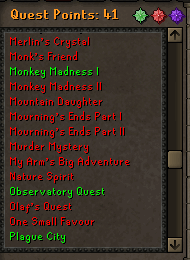
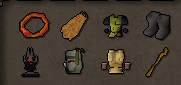
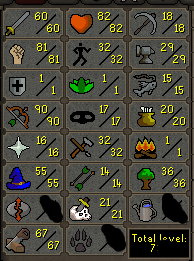
1. Pictures of the account stats 2. Pictures of the login details 13 days of membs left as of 9/1/2017 3. Pictures of the total wealth (if there is any) 4. Pictures of the quests completed quests done: Demon Slayer, Doric's Quest, Ernest the Chicken, The Knight's Sword, The Restless Ghost, Rune Mysteries, Vampire Slayer, Animal Magnetism, Biohazard, Death Plateau, Fight Arena, The Grand Tree, Lost City, Monkey Madness 1, Observatory Quest, Plague city, Priest in Peril, The Tourist Trap, Tree Gnome Village, Waterfall Quest 5. The price you will be starting bids at 90m 6. The A/W (Auto-win) for your account 110m 7. The methods of payment you are accepting OSRS gold/BTC or PP from trusted or CSGO Skins/Keys 8. Your trading conditions You go first unless trusted 9. Pictures of the account status No bans or mutes 10. Original/previous owners AND Original Email Address I am the OO Contact my skype if you have any questions!
-
-
Galaxy S8 hands down. I've had mine since release and it's the best smartphone I've had. One of the best cameras and the best display on any smartphone rn.
-
I got 45m you can buy, add my skype in signature. $1/m via PayPal
-
-
i got 74m. Hit me up on skype, in my signature. $1/m
-
I have this acc but the cheapest I'd let it go is about 275m
-
Can I get an update on what is happening with this?