TheRealJok3y
Trade With Caution
-
Joined
-
Last visited
Everything posted by TheRealJok3y
-
I will do all of them! i just pm'ed you
-
100k each account
-
the account has username login, account from 2007, and there's no email on it
-
Would people on here be interested in buying a 80 woodcutting / 80 mining / 80 fishing all on one account? Or do people just want one skill on an account to just bot on? hmm
-
It's currently 25/25/25 almost 80 wc and going to complete all free quests
-
how much do people buy 80 wc accounts for?
-
If anybody has a team on smite (Xbox1) and wants to scrim or play anytime, hmu
-
How much would a 25/25/25 account go for with 80 woodcutting? Account has username login from 2007. (Account is not completed yet) I will be selling this account in the future; pm me if you're interested in the account.
-
well if anyone is interested in buying this off me pm me, lol it's no use to me.
-
yeah i get it, i just found my old account all the way back from 2007, but everything is reset and whatnot so its just a clean account. thinking of making it a main, and selling it.
-
even when the account has no stats?
-
even if there are no stats on the account?
-
do people pay more for pay more for veteran accounts, with username logins?
-
SOLD PLEASE CLOSE
-
Pm me on here or hmu on my Skype: Phil.Mantis
-
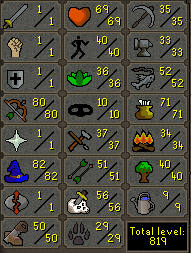
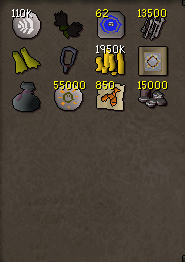
1. Pictures of the account stats: http://s1188.photobucket.com/user/omaro23/media/Stats_zpsaxjowcnb.png.html?o=0 2. Pictures of the login details: http://s1188.photobucket.com/user/omaro23/media/Acconut%20Info_zps2v59sqkr.png.html 3. Pictures of the total wealth (if there is any): http://s1188.photobucket.com/user/omaro23/media/Account%20wealth_zpsohvg76xk.png.html 4. Pictures of the quests completed: http://s1188.photobucket.com/user/omaro23/media/Questing_zpsdp5wrfcz.png.html http://s1188.photobucket.com/user/omaro23/media/Questing%20rfd_zpslmohhitg.png.html http://s1188.photobucket.com/user/omaro23/media/questing%20rfd2_zpszw9vdhvj.png.html 5. The price you will be starting bids at: None, just post your bids below or message me! 6. The A/W (Auto-win) for your account: None, I will view all bids and highest bidder wins. 7. The methods of payment you are accepting: Paypal only. 8. Your trading conditions: I'll go first if I trust you or if you're highly trusted, if not I will get a MM. 9. Account status: http://s1188.photobucket.com/user/omaro23/media/Account%20status_zpszbhap1hd.png.html 10. Original/previous owners AND Original Email Address: I am the original owner of the account and will give all the information.
-
same lol
-
Let me know what you think! Stats & total wealth are shown! (56 Quest points as well) I'd like to hear everyones opinions and suggestions as well! If you have any questions, please pm me or comment on the thread! Thanks!
-
you have one?
-
If anyone has a smite code for xbox 1 hmu ill buy it!
-
-
lmfaoooooooo
-
its either the thorn or the last word, not sure which one you're talking about.
-
Streaming Destiny for a while until I leave, check me out and follow the stream, top pvp player. http://www.twitch.tv/Jok3y
-