






SquiddySen
Members
-
Joined
-
Last visited
Everything posted by SquiddySen
-
Yes that is the version I have. First time seeing this today but im not on deck for any kind of updates or patches?
-
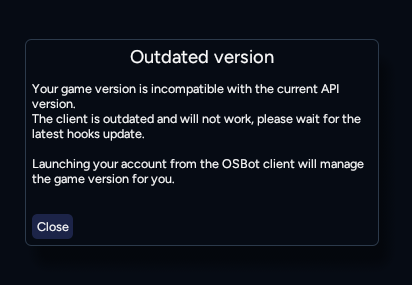
Anyone else getting this right now? I feel like everything I have is up to date. Is this because we are pending a patch tomorrow?
-
-
Thanks Czar! Feel free to let me know when its updated 😁
-
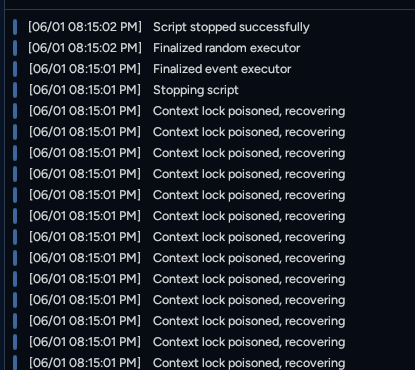
Sup Czar! Quick heads up. I recently enabled my bank PIN and now im getting this when mining Amethyst Crystal:
-
Yoo Czar, May I get a trial of this script please? 😁
-
Sup Czar! The Imcando Off-Hand is working now, thank you! I did notice that when I had the flag enabled for "upgraded sack", it started banking at 162 pay dirt rather than the 189, just thought id let you know 😁 Also, thought of this as a suggestion, would it be worth having the script be able to bank all ores via the deposit button rather than clicking each ore?
-
Sup Czar, Did they ever approve it your new version?
-
Feel free to let me know when the update goes live 😄
-
You're actually the 🐐 !! Tysm Czar 🤝 I'll call out any other findings and suggestions 😁
-
Yes the Imcando Hammer is off hand 😁
-
Is there any checkbox that I have to mark that states I am wielding the Imcando Hammer? When it starts, it keeps going to collect hammer and taking up an additional inventory spot.
-
Czar! Thank you! Do you think maybe I can get a re-up on the script trial? 👉👈😁 I didnt really get to use it initially because of time but I really wanted to try the script with the imcando hammer feature . If not all good, I completely understand 🫱🫲
-
May I please try this script out Czar? 👏
-
Does this support Imcando Hammer?
-
Hi Czar! May I get a trial of this script, pleaseeee?😁
-
May I try the perfect mining script?


