






atomousledge
Members
-
Joined
-
Last visited
-
Can you link to solution?
-
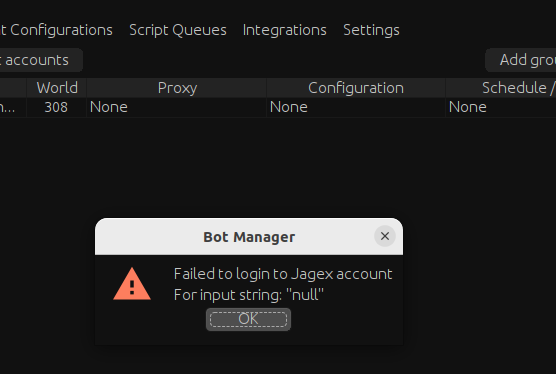
How do you confirm with email? I just get This error when trying to login
-
This didn't resolve the issue for me - any other guesses?
-
It didn't help, still the same issue with no special characters in the password
-
The stealth client is working again, however I still receive an error while trying to launch from Bot Manager for my Jagex account Found this - my password certainly has special characters.. will go try changing it and report back.
-
Okay makes sense - hopefully I've actually progressed past my initial issue and when this is resolved everything works!
-
Well, this is progress! Any idea how to progress past this? I tried re-creating the account.
-
I have Oracles stable JRE not adoptium, I'll try that! I'm on linux, here is the folder in Homedir it created and where I unpacked JRE. :~/OSBot$ tree . ├── Data │ ├── client.jar │ ├── filter_8312f93.jar │ ├── map.bin │ └── map.zip ├── Local │ ├── accounts │ ├── boot │ ├── breaks │ ├── breakSettings │ ├── favorites │ ├── groups │ ├── jre │ │ ├── bin │ │ │ ├── jar │ │ │ ├── jarsigner │ │ │ ├── java │ │ │ ├── javac │ │ │ ├── javadoc │ │ │ ├── javap │ │ │ ├── jcmd │ │ │ ├── jconsole │ │ │ ├── jdb │ │ │ ├── jdeprscan │ │ │ ├── jdeps │ │ │ ├── jfr │ │ │ ├── jhsdb │ │ │ ├── jimage │ │ │ ├── jinfo │ │ │ ├── jjs │ │ │ ├── jlink │ │ │ ├── jmap │ │ │ ├── jmod │ │ │ ├── jps │ │ │ ├── jrunscript │ │ │ ├── jshell │ │ │ ├── jstack │ │ │ ├── jstat │ │ │ ├── jstatd │ │ │ ├── keytool │ │ │ ├── pack200 │ │ │ ├── rmic │ │ │ ├── rmid │ │ │ ├── rmiregistry │ │ │ ├── serialver │ │ │ └── unpack200 │ │ ├── conf │ │ │ ├── logging.properties │ │ │ ├── management │ │ │ │ ├── jmxremote.access │ │ │ │ ├── jmxremote.password.template │ │ │ │ └── management.properties │ │ │ ├── net.properties │ │ │ ├── security │ │ │ │ ├── java.policy │ │ │ │ ├── java.security │ │ │ │ └── policy │ │ │ │ ├── limited │ │ │ │ │ ├── default_local.policy │ │ │ │ │ ├── default_US_export.policy │ │ │ │ │ └── exempt_local.policy │ │ │ │ ├── README.txt │ │ │ │ └── unlimited │ │ │ │ ├── default_local.policy │ │ │ │ └── default_US_export.policy │ │ │ └── sound.properties │ │ ├── include │ │ │ ├── classfile_constants.h │ │ │ ├── jawt.h │ │ │ ├── jdwpTransport.h │ │ │ ├── jni.h │ │ │ ├── jvmticmlr.h │ │ │ ├── jvmti.h │ │ │ └── linux │ │ │ ├── jawt_md.h │ │ │ └── jni_md.h │ │ ├── jmods ... │ │ ├── lib │ │ │ ├── classlist │ │ │ ├── ct.sym │ │ │ ├── jexec │ │ │ ├── jfr │ │ │ │ ├── default.jfc │ │ │ │ └── profile.jfc │ │ │ ├── jli │ │ │ │ └── libjli.so │ │ │ ├── jrt-fs.jar │ │ │ ├── jspawnhelper │ │ │ ├── jvm.cfg │ │ │ ├── libattach.so │ │ │ ├── libawt_headless.so │ │ │ ├── libawt.so │ │ │ ├── libawt_xawt.so │ │ │ ├── libdt_socket.so │ │ │ ├── libextnet.so │ │ │ ├── libfontmanager.so │ │ │ ├── libinstrument.so │ │ │ ├── libj2gss.so │ │ │ ├── libj2pcsc.so │ │ │ ├── libj2pkcs11.so │ │ │ ├── libjaas.so │ │ │ ├── libjavajpeg.so │ │ │ ├── libjava.so │ │ │ ├── libjawt.so │ │ │ ├── libjdwp.so │ │ │ ├── libjimage.so │ │ │ ├── libjsig.so │ │ │ ├── libjsound.so │ │ │ ├── liblcms.so │ │ │ ├── libmanagement_agent.so │ │ │ ├── libmanagement_ext.so │ │ │ ├── libmanagement.so │ │ │ ├── libmlib_image.so │ │ │ ├── libnet.so │ │ │ ├── libnio.so │ │ │ ├── libprefs.so │ │ │ ├── librmi.so │ │ │ ├── libsaproc.so │ │ │ ├── libsctp.so │ │ │ ├── libsplashscreen.so │ │ │ ├── libsunec.so │ │ │ ├── libunpack.so │ │ │ ├── libverify.so │ │ │ ├── libzip.so │ │ │ ├── modules │ │ │ ├── psfontj2d.properties │ │ │ ├── psfont.properties.ja │ │ │ ├── security │ │ │ │ ├── blocked.certs │ │ │ │ ├── cacerts │ │ │ │ ├── default.policy │ │ │ │ └── public_suffix_list.dat │ │ │ ├── server │ │ │ │ ├── libjsig.so │ │ │ │ ├── libjvm.so │ │ │ │ └── Xusage.txt │ │ │ ├── src.zip │ │ │ └── tzdb.dat │ │ ├── man │ │ │ └── man1 │ │ │ ├── jar.1 │ │ │ ├── jarsigner.1 │ │ │ ├── java.1 ... │ │ │ └── unpack200.1 │ │ ├── README.html │ │ └── release │ ├── manager_accounts │ ├── manager_clientconfigs │ ├── manager_tasks │ └── proxies └── Scripts 93 directories, 407 files
-
What version of OSBot do you use? `2.7.12` What JAVA version do you use? `11.0.22` Which plan do you use? Monthly, bought yesterday and trying to get setup Are you launching trough CLI or GUI? CLI Can you send a screenshot of the menu you are having issues in and the logger output whenever possible. (Attached) Describe the issue (Below) What are the steps - and in what order - to replicate the issue? As far as I can tell, if you follow my system context/config it should be reproduced - Host is Ubuntu 22.04 LTS, fresh install with basically just JRE and OSBot installed - Account is Jagex - Stealth Mode appears to work, but cannot login because of Jagex Account issue - In bot mode, I can configure everything fine in the GUI, but once I hit Start it moves from `Planned` -> `Loading` and stays there forever. Here are logs: ``` $ java -jar OSBot\ 2.7.12.jar -debug -verbose Debug enabled on port 5005 [INFO][02/13 06:13:38 PM]: Loaded 1 RS accounts! Failed to identify bot pid to check activity Launching schedule None with task None from 00:00 up till 23:59:59 ``` If I click "View Console" I get a Null pointer error - I'm assuming this is because it has failed to boot the client and thus has no reference to the client's console. Here in-case it provides a valid hint: ``` Exception in thread "AWT-EventQueue-0" java.lang.NullPointerException at org.osbot.Bc.iIIIIiiIIiI(gt:871) at org.osbot.FA.iIIIIiiIIiI(gt:19) at org.osbot.Gc.IiIiIiIIIII(sr:880) at java.desktop/javax.swing.AbstractButton.fireActionPerformed(AbstractButton.java:1967) at java.desktop/javax.swing.AbstractButton$Handler.actionPerformed(AbstractButton.java:2308) at java.desktop/javax.swing.DefaultButtonModel.fireActionPerformed(DefaultButtonModel.java:405) at java.desktop/javax.swing.DefaultButtonModel.setPressed(DefaultButtonModel.java:262) at java.desktop/javax.swing.AbstractButton.doClick(AbstractButton.java:369) at java.desktop/javax.swing.plaf.basic.BasicMenuItemUI.doClick(BasicMenuItemUI.java:1020) at java.desktop/javax.swing.plaf.basic.BasicMenuItemUI$Handler.mouseReleased(BasicMenuItemUI.java:1064) at java.desktop/java.awt.AWTEventMulticaster.mouseReleased(AWTEventMulticaster.java:297) at java.desktop/java.awt.Component.processMouseEvent(Component.java:6635) at java.desktop/javax.swing.JComponent.processMouseEvent(JComponent.java:3342) at java.desktop/java.awt.Component.processEvent(Component.java:6400) at java.desktop/java.awt.Container.processEvent(Container.java:2263) at java.desktop/java.awt.Component.dispatchEventImpl(Component.java:5011) at java.desktop/java.awt.Container.dispatchEventImpl(Container.java:2321) at java.desktop/java.awt.Component.dispatchEvent(Component.java:4843) at java.desktop/java.awt.LightweightDispatcher.retargetMouseEvent(Container.java:4918) at java.desktop/java.awt.LightweightDispatcher.processMouseEvent(Container.java:4547) at java.desktop/java.awt.LightweightDispatcher.dispatchEvent(Container.java:4488) at java.desktop/java.awt.Container.dispatchEventImpl(Container.java:2307) at java.desktop/java.awt.Window.dispatchEventImpl(Window.java:2772) at java.desktop/java.awt.Component.dispatchEvent(Component.java:4843) at java.desktop/java.awt.EventQueue.dispatchEventImpl(EventQueue.java:772) at java.desktop/java.awt.EventQueue$4.run(EventQueue.java:721) at java.desktop/java.awt.EventQueue$4.run(EventQueue.java:715) at java.base/java.security.AccessController.doPrivileged(Native Method) at java.base/java.security.ProtectionDomain$JavaSecurityAccessImpl.doIntersectionPrivilege(ProtectionDomain.java:85) at java.base/java.security.ProtectionDomain$JavaSecurityAccessImpl.doIntersectionPrivilege(ProtectionDomain.java:95) at java.desktop/java.awt.EventQueue$5.run(EventQueue.java:745) at java.desktop/java.awt.EventQueue$5.run(EventQueue.java:743) at java.base/java.security.AccessController.doPrivileged(Native Method) at java.base/java.security.ProtectionDomain$JavaSecurityAccessImpl.doIntersectionPrivilege(ProtectionDomain.java:85) at java.desktop/java.awt.EventQueue.dispatchEvent(EventQueue.java:742) at java.desktop/java.awt.EventDispatchThread.pumpOneEventForFilters(EventDispatchThread.java:203) at java.desktop/java.awt.EventDispatchThread.pumpEventsForFilter(EventDispatchThread.java:124) at java.desktop/java.awt.EventDispatchThread.pumpEventsForHierarchy(EventDispatchThread.java:113) at java.desktop/java.awt.EventDispatchThread.pumpEvents(EventDispatchThread.java:109) at java.desktop/java.awt.EventDispatchThread.pumpEvents(EventDispatchThread.java:101) at java.desktop/java.awt.EventDispatchThread.run(EventDispatchThread.java:90) ```

-
I'm a little stuck here, perhaps this is a bug re. Jagex accounts? - OS = Ubuntu 22.04 LTS - Jagex Account - OSBot 2.7.12 - Bot Manager `stealth` appears to work okay, although I cannot create an account that isn't a Jagex Account so no scripts can login properly. 'Bot Manager' Boots fine, and I can configure everything in the GUI, however when trying to start any script it gets stuck on `Loading`. I don't see any useful logs being dumped - how can I attach to the debug port? ``` $ java -jar OSBot\ 2.7.12.jar -debug Debug enabled on port 5005 [INFO][02/13 02:22:38 PM]: Loaded 1 RS accounts! Failed to identify bot pid to check activity Launching schedule Task > Train Combat with task Train Combat from 00:00 up till 23:59:59 ```

