




Jump to content
View in the app

A better way to browse. Learn more.

OSBot :: 2007 OSRS Botting

A full-screen app on your home screen with push notifications, badges and more.

To install this app on iOS and iPadOS
  1. Tap the Share icon in Safari
  2. Scroll the menu and tap Add to Home Screen.
  3. Tap Add in the top-right corner.
To install this app on Android
  1. Tap the 3-dot menu (⋮) in the top-right corner of the browser.
  2. Tap Add to Home screen or Install app.
  3. Confirm by tapping Install.

Leg1t

Members
  • Joined

  • Last visited

  1. Leg1t posted a topic in General Help
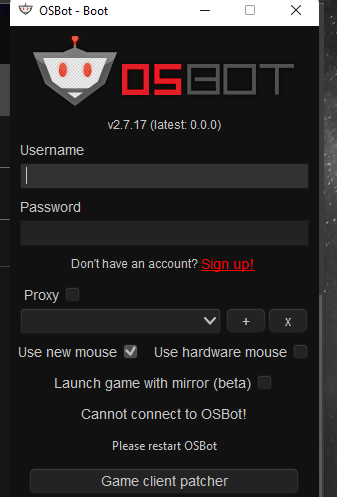
    I dont bot all the time, a few weeks ago osbot stopped working. just looks like this now. Not too sure what to do to repair it. Patcher just jacks up my runelite so im not doing that.
  2. Leg1t replied to Token's topic in Construction
    This is still broken for mythical capes.
  3. I guess some can get it to work. mine tries twice at cave then just turns pray off and stands there.
  4. Leg1t replied to Khaleesi's topic in Minigames
    After trial i had to buy it. Flawless. Thanks alot.
  5. Leg1t replied to Khaleesi's topic in Minigames
    Could I have a trail please? Thing looks sweet, the other ones I looked at don't have the same reviews this one does. I'm excited.
  6. Leg1t replied to Token's topic in Construction
    messed with settings and got it. Thanks!
  7. Leg1t replied to Token's topic in Construction
    Could I have a refund? This isnt what I thought it would be. I just wanted to make mahog tables and its buying oak planks and doing other things.

Account

Navigation

Search

Configure browser push notifications

Chrome (Android)
  1. Tap the lock icon next to the address bar.
  2. Tap Permissions → Notifications.
  3. Adjust your preference.
Chrome (Desktop)
  1. Click the padlock icon in the address bar.
  2. Select Site settings.
  3. Find Notifications and adjust your preference.