




Jump to content
View in the app

A better way to browse. Learn more.

OSBot :: 2007 OSRS Botting

A full-screen app on your home screen with push notifications, badges and more.

To install this app on iOS and iPadOS
  1. Tap the Share icon in Safari
  2. Scroll the menu and tap Add to Home Screen.
  3. Tap Add in the top-right corner.
To install this app on Android
  1. Tap the 3-dot menu (⋮) in the top-right corner of the browser.
  2. Tap Add to Home screen or Install app.
  3. Confirm by tapping Install.

drossman97

Members
  • Joined

  • Last visited

Everything posted by drossman97

  1. drossman97 replied to Eagle Scripts's topic in Minigames
    I would like a trial too If you don't mind!
  2. bro your wt is dope!
  3. This is so over my head haha. You should’ve seen the struggle of getting even this far😩
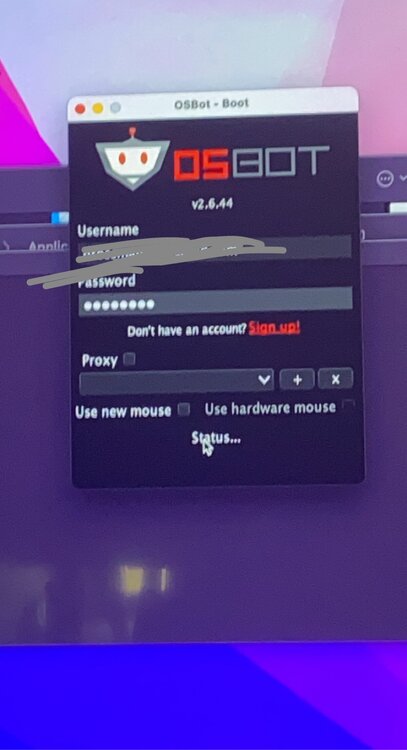
  4. Yeah I know, I mean there’s nothing I can do. I type the info in and nothing happens when I hit enter it just stays on status. Just restart the app or reinstall the app? I’ll check as soon as i have the chance! Thank you for your thinking.
  5. I’m not Sure what to do from here. I had to download a Java 8 update just to make it this far. Java 8 Update 311
Account

Navigation

Search

Configure browser push notifications

Chrome (Android)
  1. Tap the lock icon next to the address bar.
  2. Tap Permissions → Notifications.
  3. Adjust your preference.
Chrome (Desktop)
  1. Click the padlock icon in the address bar.
  2. Select Site settings.
  3. Find Notifications and adjust your preference.