




Jump to content
View in the app

A better way to browse. Learn more.

OSBot :: 2007 OSRS Botting

A full-screen app on your home screen with push notifications, badges and more.

To install this app on iOS and iPadOS
  1. Tap the Share icon in Safari
  2. Scroll the menu and tap Add to Home Screen.
  3. Tap Add in the top-right corner.
To install this app on Android
  1. Tap the 3-dot menu (⋮) in the top-right corner of the browser.
  2. Tap Add to Home screen or Install app.
  3. Confirm by tapping Install.

Avaz

Members
  • Joined

  • Last visited

  1. Sometimes the bot goes just outside castle wars and gets stuck untill you fix it, nothing in logs that says why this is, nothing rly happening in logs more then ''doing banking'' when this occures
  2. Avaz replied to sakurablossom's topic in Introductions
    Wadup
  3. might have small effect, but major things is replicated patterns
  4. Thats unlucky
  5. Say i bot on one account on a laptop, Then i play normaly on another acc on my desktop, the accounts never meet in game/trade or do anything even on the same world, if my bot account is catched, will the normal acc on desktop get banned aswell?
  6. got it to work by starting at castle wars is now banking
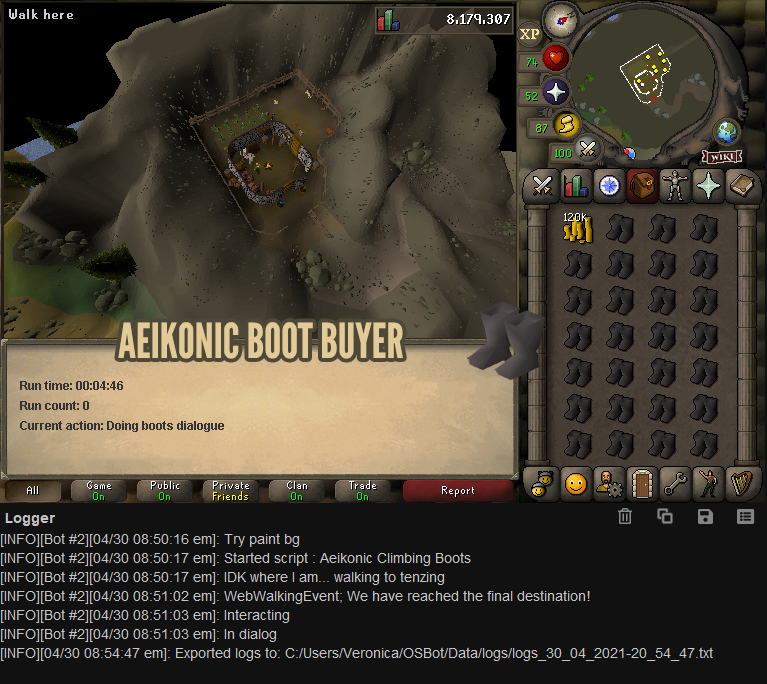
  7. It buys 1 inventory then it just gets stuck here
  8. Avaz posted a topic in Price Check
    How much would accounts with 60/60/60 go for?
  9. Anyone have stock on tut accounts? Hit me up

Account

Navigation

Search

Configure browser push notifications

Chrome (Android)
  1. Tap the lock icon next to the address bar.
  2. Tap Permissions → Notifications.
  3. Adjust your preference.
Chrome (Desktop)
  1. Click the padlock icon in the address bar.
  2. Select Site settings.
  3. Find Notifications and adjust your preference.