






Burbuja
Members
-
Joined
-
Last visited
-
Burbuja changed their profile photo
-
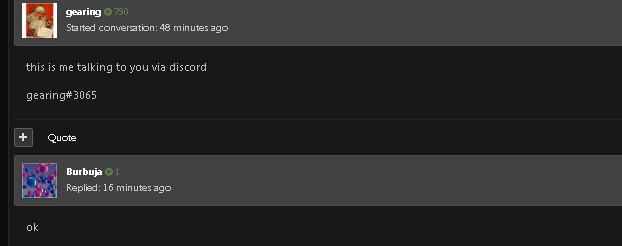
if it's so bad because you write to me and first look at your edits and then criticize others, I think I already regret having worked on this garbage ..


-
trash, it was you who bothered and insulted.
-
because there will be shits like you call shit to a lady but more shit is your mother who gave you trash :X
-
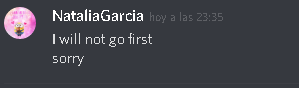
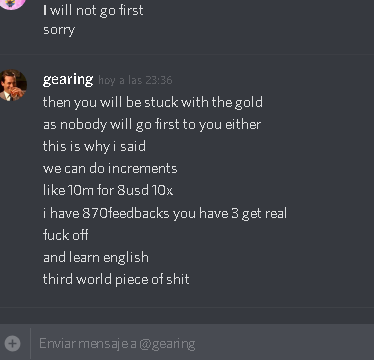
Change of 100 m in the balance of PayPa manl I will not go first, it is a legitimate person to let me know discord NataliaGarcia#0127do you know twith prime?An honest question and an answer in time, who needs to buy main subscribers ? pm meand to be clear, everyone has that call to be so pathetic that what they do is make fun of others, maybe continue, but remember that you can be the first, but do not know when it may be the last. and maybe I am the first luck ...If I understand perfectly I am not a gringa, I am from Panama and I am not perfect, your duty if an error is correct so as not to mock or criticize, here we are to help each other not to make fun of people. in a group, that animated I'm wrong eh 'but I know I'm going to keep going ...I BELIEVE AND I HAVE UNDERSTOOD, FOR GOOD UNDERSTANDING FEW WORDS ,AND I MAKE QUEST DESERT TREASURE ANIMAL MAGNETY ARE THT ONES I DO THE MOSTLooking for employment, I DO NOT SKILLS JUST MISSIONSI'm interested pm add Discord NataliaGarcia#0127



Account
Navigation
Search
Configure browser push notifications
Chrome (Android)
- Tap the lock icon next to the address bar.
- Tap Permissions → Notifications.
- Adjust your preference.
Chrome (Desktop)
- Click the padlock icon in the address bar.
- Select Site settings.
- Find Notifications and adjust your preference.
Safari (iOS 16.4+)
- Ensure the site is installed via Add to Home Screen.
- Open Settings App → Notifications.
- Find your app name and adjust your preference.
Safari (macOS)
- Go to Safari → Preferences.
- Click the Websites tab.
- Select Notifications in the sidebar.
- Find this website and adjust your preference.
Edge (Android)
- Tap the lock icon next to the address bar.
- Tap Permissions.
- Find Notifications and adjust your preference.
Edge (Desktop)
- Click the padlock icon in the address bar.
- Click Permissions for this site.
- Find Notifications and adjust your preference.
Firefox (Android)
- Go to Settings → Site permissions.
- Tap Notifications.
- Find this site in the list and adjust your preference.
Firefox (Desktop)
- Open Firefox Settings.
- Search for Notifications.
- Find this site in the list and adjust your preference.