
Account Merchant
Members
-
Joined
-
Last visited
Everything posted by Account Merchant
-
I got an order! But I’m going first (which is not desired). Oh well, I’ll take what I can get!
-
Man, Im just trynna get feedback so I can be trusted ?
-
-
What training methods are you ok with? Cannoning?
-
-
-
Hello, I am trying to get into doing work for people, but no one wants to deal with someone that has no feedback. I am requesting small jobs that I can do so that I can build some feedback. LMK!
-
-
-
-
Having the same problem finding work ?
-
-
Supposed to only bump every 6 hours
-
17M for the quests, 20M for the items 37M Total
-
-
I don’t think he wants it anymore. Been ghosting
-
7m if you have monkey madness 2 unlocked
-
-
What price/time quote are you looking for?
-
Available now, can get it done in 2 hours
-
how much? Wondering for future reference
-
Alright, so roughly 130m with 3.5gp/xp Prayer pots. How much would buying a maxed melee account be?
-
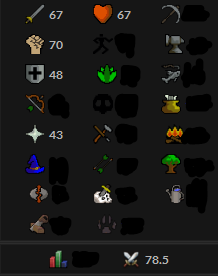
Looking at my options for the future. I have a account I was trying to get to max melee stats. What would be a time and price quote to get my Attack-Strength-Defence to 99 at NMZ?
-
80m, 7 days
-
7m, 5 Hours for quests