





Jump to content
View in the app

A better way to browse. Learn more.

OSBot :: 2007 OSRS Botting

A full-screen app on your home screen with push notifications, badges and more.

To install this app on iOS and iPadOS
  1. Tap the Share icon in Safari
  2. Scroll the menu and tap Add to Home Screen.
  3. Tap Add in the top-right corner.
To install this app on Android
  1. Tap the 3-dot menu (⋮) in the top-right corner of the browser.
  2. Tap Add to Home screen or Install app.
  3. Confirm by tapping Install.

hanako12

Members
  • Joined

  • Last visited

Everything posted by hanako12

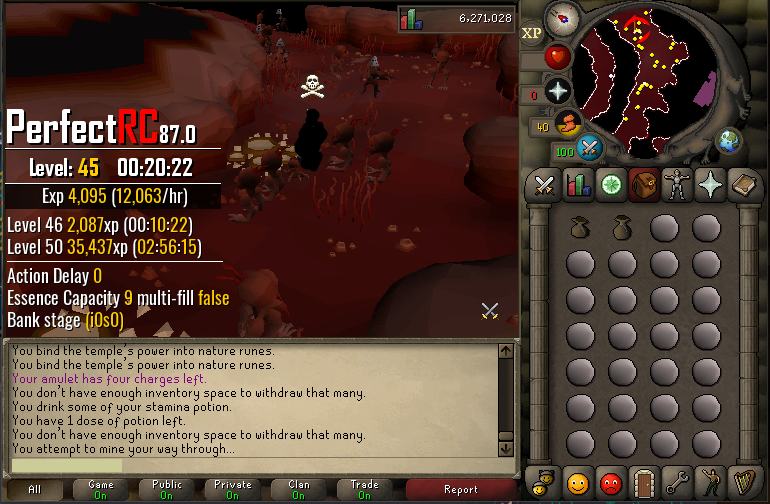
  1. These are some bugs that I've noticed -The bot is very slow when banking, takes too long to fill pouches and withdraw essence. -Doesn't keep potion in inventory when "Keep potion" is ticked -Spam clicks wrong section on mini-map in abyss (check screenshot. Bot will spam click the outer circle when completing the mining obstacle) -Sometimes clicks are way too accurate
Account

Navigation

Search

Configure browser push notifications

Chrome (Android)
  1. Tap the lock icon next to the address bar.
  2. Tap Permissions → Notifications.
  3. Adjust your preference.
Chrome (Desktop)
  1. Click the padlock icon in the address bar.
  2. Select Site settings.
  3. Find Notifications and adjust your preference.

