




Jump to content
View in the app

A better way to browse. Learn more.

OSBot :: 2007 OSRS Botting

A full-screen app on your home screen with push notifications, badges and more.

To install this app on iOS and iPadOS
  1. Tap the Share icon in Safari
  2. Scroll the menu and tap Add to Home Screen.
  3. Tap Add in the top-right corner.
To install this app on Android
  1. Tap the 3-dot menu (⋮) in the top-right corner of the browser.
  2. Tap Add to Home screen or Install app.
  3. Confirm by tapping Install.

fred42

Members
  • Joined

  • Last visited

Everything posted by fred42

  1. Seems to be working so far... But I would want it to be randomized... Projectpacts hunter script... I wouldn't think so but maybe... it's the only script i ever use
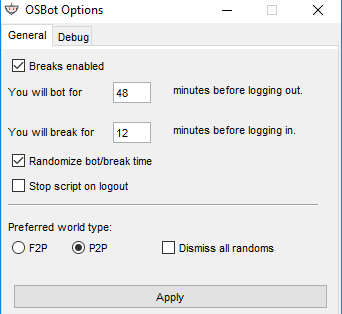
  2. Hey everyone. I'm not sure what I'm doing wrong, but for some reason, once I start a script, with break handler enabled, the script will run for a minute then logout for a minute, and repeat. Does anyone know why? I attached how I setup my break manager. Anyone got any idea what I'm doing wrong?
  3. Hey there mate, script looks pretty good. Could I please have a trial? Thank you
  4. Had this script for a while now, and it's fucking dope. All bugs get fixed very quickly, and Project responds as soon as he can. 10/10 for customer support. 10/10 for bot. Keep up the good work, Psych

Account

Navigation

Search

Configure browser push notifications

Chrome (Android)
  1. Tap the lock icon next to the address bar.
  2. Tap Permissions → Notifications.
  3. Adjust your preference.
Chrome (Desktop)
  1. Click the padlock icon in the address bar.
  2. Select Site settings.
  3. Find Notifications and adjust your preference.