Jump to content
View in the app

A better way to browse. Learn more.

OSBot :: 2007 OSRS Botting

A full-screen app on your home screen with push notifications, badges and more.

To install this app on iOS and iPadOS
  1. Tap the Share icon in Safari
  2. Scroll the menu and tap Add to Home Screen.
  3. Tap Add in the top-right corner.
To install this app on Android
  1. Tap the 3-dot menu (⋮) in the top-right corner of the browser.
  2. Tap Add to Home screen or Install app.
  3. Confirm by tapping Install.

rkjs

Members
  • Joined

  • Last visited

  1. Oh, i see, fair enough. Can i get a Price Check then?
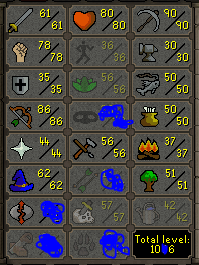
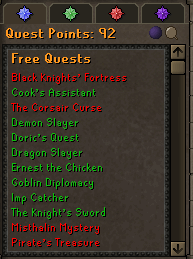
  2. Hi Guys Im wanting to sell this account, anyone know how much it should go for? Thanks
  3. rkjs replied to Czar's topic in Minigames
    I missed my free trial, is it possible to get it reactivated? i asked for it on 10/01/2019 but went on holiday 3 days after when my request for the trial was liked/activated
  4. rkjs replied to Czar's topic in Minigames
    currently looking for a pest control script to buy, can i get a trial of your script please? thanks
  5. rkjs replied to Khaleesi's topic in Minigames
    Hi, I've been using a pest control script on ***** called Prime Pest Contorl, I used it for the whole 3 hours free trial, was flawless however the full version is $0.10/hr so I'm currently looking around for a pest control script i can purchase and use forever, would it be possible to get a 24 hour trial of this script? Thanks

Account

Navigation

Search

Configure browser push notifications

Chrome (Android)
  1. Tap the lock icon next to the address bar.
  2. Tap Permissions → Notifications.
  3. Adjust your preference.
Chrome (Desktop)
  1. Click the padlock icon in the address bar.
  2. Select Site settings.
  3. Find Notifications and adjust your preference.