Jump to content
View in the app

A better way to browse. Learn more.

OSBot :: 2007 OSRS Botting

A full-screen app on your home screen with push notifications, badges and more.

To install this app on iOS and iPadOS
  1. Tap the Share icon in Safari
  2. Scroll the menu and tap Add to Home Screen.
  3. Tap Add in the top-right corner.
To install this app on Android
  1. Tap the 3-dot menu (⋮) in the top-right corner of the browser.
  2. Tap Add to Home screen or Install app.
  3. Confirm by tapping Install.

Slamminsam45

Members
  • Joined

  • Last visited

Everything posted by Slamminsam45

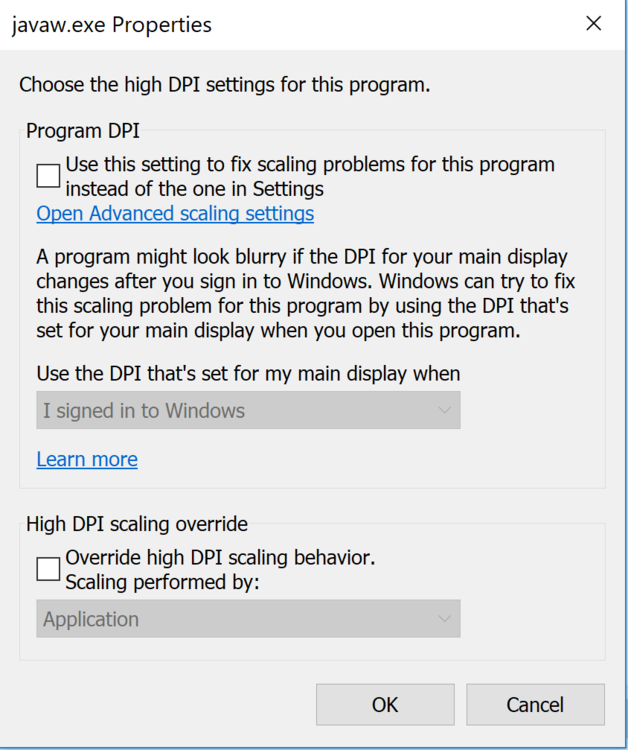
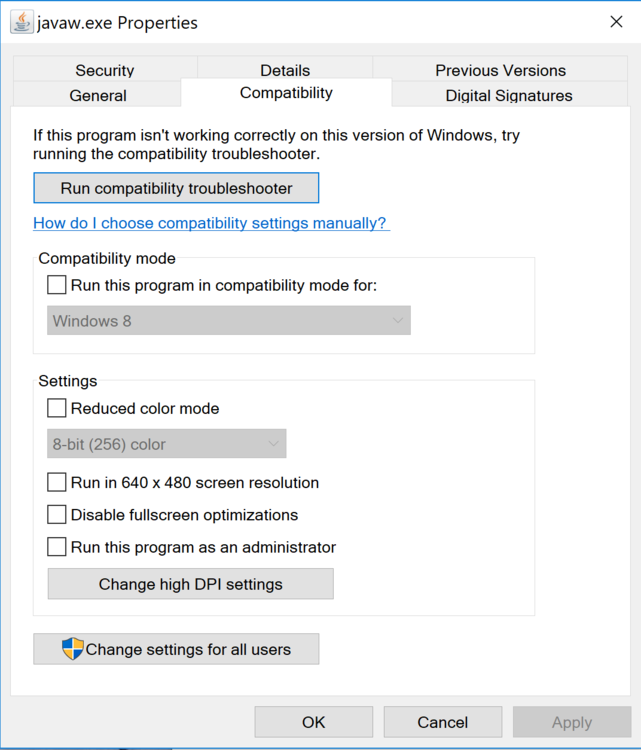
  1. When I open the file location the first picture is what pops up, so then I clicked on change high dpi settings and the second picture is what came up after that... what should I do now? I've tried both options on the second picture and nothing has worked.
  2. Hey all, new to these forums so hopefully this is the right place. I just bought the Khan Wintertodt script, however when I launch it I am unable to press the start button on the pop up GUI because I am on a 4k res laptop. I attached a pic to show what is happening, please help!
  3. I am kind of new here everyone, but I was just wondering if there were any slayer scripts that are recommended?
Account

Navigation

Search

Configure browser push notifications

Chrome (Android)
  1. Tap the lock icon next to the address bar.
  2. Tap Permissions → Notifications.
  3. Adjust your preference.
Chrome (Desktop)
  1. Click the padlock icon in the address bar.
  2. Select Site settings.
  3. Find Notifications and adjust your preference.