




Jump to content
View in the app

A better way to browse. Learn more.

OSBot :: 2007 OSRS Botting

A full-screen app on your home screen with push notifications, badges and more.

To install this app on iOS and iPadOS
  1. Tap the Share icon in Safari
  2. Scroll the menu and tap Add to Home Screen.
  3. Tap Add in the top-right corner.
To install this app on Android
  1. Tap the 3-dot menu (⋮) in the top-right corner of the browser.
  2. Tap Add to Home screen or Install app.
  3. Confirm by tapping Install.

kuroshibainu

Members
  • Joined

  • Last visited

  1. Have you checked your proxy settings in the OSBot - Boot? It should look like this. Also mine just started working for I don't know what reason even though i did nothing
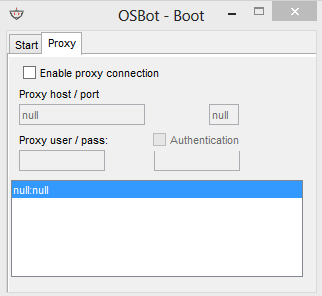
  2. OSBot giving me "SOCKS Configuration Error" even though the "enable proxy connection" checkbox is not ticked. Can someone help me please? Logger: [INFO][09/21 01:14:09 AM]: Loaded 2 RS accounts! [INFO][09/21 01:14:11 AM]: Welcome to OSBot 2.4.141! [INFO][09/21 01:16:40 AM]: Updated injection hooks for client revision : 154! [DEBUG][Bot #1][09/21 01:16:40 AM]: Initializing stealth injection bot... [INFO][Bot #1][09/21 01:16:40 AM]: Downloading latest RS2 old-school client parameters... [INFO][09/21 01:17:02 AM]: Started bot #1 Edit: its working now without anything changing

Account

Navigation

Search

Configure browser push notifications

Chrome (Android)
  1. Tap the lock icon next to the address bar.
  2. Tap Permissions → Notifications.
  3. Adjust your preference.
Chrome (Desktop)
  1. Click the padlock icon in the address bar.
  2. Select Site settings.
  3. Find Notifications and adjust your preference.