Jump to content
View in the app

A better way to browse. Learn more.

OSBot :: 2007 OSRS Botting

A full-screen app on your home screen with push notifications, badges and more.

To install this app on iOS and iPadOS
  1. Tap the Share icon in Safari
  2. Scroll the menu and tap Add to Home Screen.
  3. Tap Add in the top-right corner.
To install this app on Android
  1. Tap the 3-dot menu (⋮) in the top-right corner of the browser.
  2. Tap Add to Home screen or Install app.
  3. Confirm by tapping Install.

trouchie

Members
  • Joined

  • Last visited

Everything posted by trouchie

  1. trouchie replied to Token's topic in Minigames
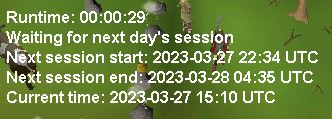
    Thanks for the reply. I'm really confused on how the starting time works... At 15:14 UTC, I set the "starting botting" at 17:00 UTC - 00:00. But then it tries to start the bot at 22:34 and finish at 4am the next day? How do I set it up so it can start the moment I click start? I tried putting 15:15 - 15:30 but it ends up logging out at 15:30. What am I doing wrong?
  2. trouchie replied to Token's topic in Minigames
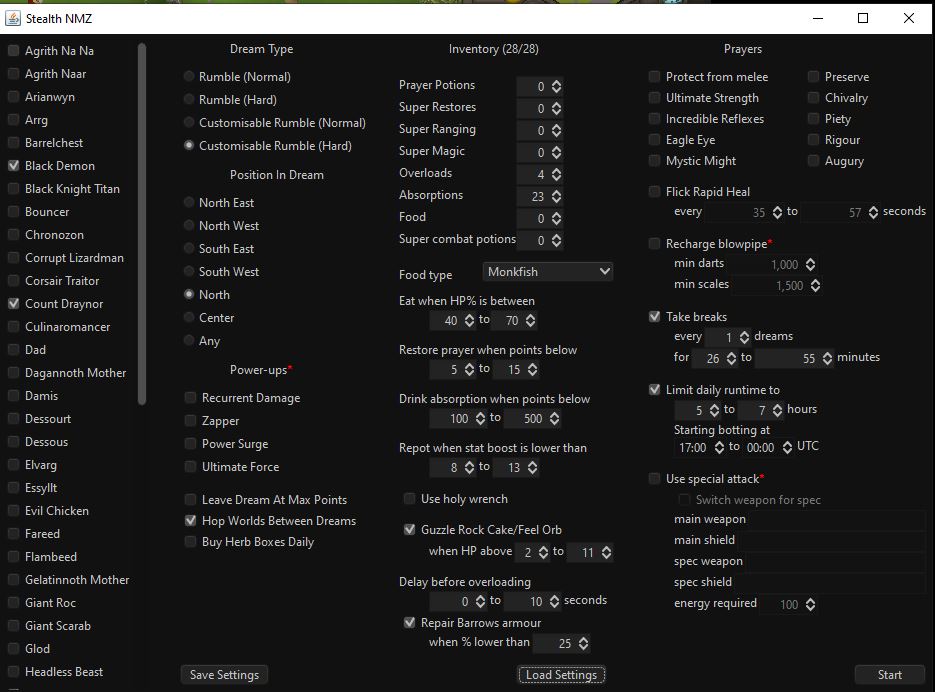
    Hey, thanks for making it! I just purchased the bot. 1) I wanted to confirm a few things, I'm using DH, would you recommend that I leave flick rapid healing off and just guzzle between 1-10hp to make it seem more realistic? 2) What bosses are best while DHing? 3) Is there a rule of thumb as to how many absorption/overload potions I should select? 4) What is the most optimal "position in dream"? 5) Where does it go to repair my barrows set, and does it come back to NMZ afterwards? Thanks again!
  3. trouchie replied to Tom's topic in Fishing & Cooking
    trial please really interested in buying

Account

Navigation

Search

Configure browser push notifications

Chrome (Android)
  1. Tap the lock icon next to the address bar.
  2. Tap Permissions → Notifications.
  3. Adjust your preference.
Chrome (Desktop)
  1. Click the padlock icon in the address bar.
  2. Select Site settings.
  3. Find Notifications and adjust your preference.