




Jump to content
View in the app

A better way to browse. Learn more.

OSBot :: 2007 OSRS Botting

A full-screen app on your home screen with push notifications, badges and more.

To install this app on iOS and iPadOS
  1. Tap the Share icon in Safari
  2. Scroll the menu and tap Add to Home Screen.
  3. Tap Add in the top-right corner.
To install this app on Android
  1. Tap the 3-dot menu (⋮) in the top-right corner of the browser.
  2. Tap Add to Home screen or Install app.
  3. Confirm by tapping Install.

Lett

Members
  • Joined

  • Last visited

Everything posted by Lett

  1. Lett replied to Apaec's topic in Combat & Slayer
    Just got banned, but I am pretty sure it is the free magic script I tried at the end. Have used this script for like 5 days, botting 3-6hrs flawless, and after 1hr and 30mins with the magic one i got banned!
  2. Lett replied to Nym's topic in Magic & Prayer
    Got banned after 1hr and 30min ish, but the bot worked great lol.
  3. Lett replied to Nym's topic in Magic & Prayer
    Trying this out right now!
  4. Lett replied to Apaec's topic in Combat & Slayer
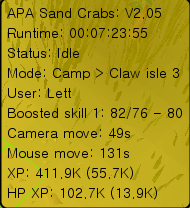
    Still works flawless, 60-76str so far, GREAT script.
  5. Lett replied to Apaec's topic in Combat & Slayer
    Still works fine for me..
  6. Lett replied to Apaec's topic in Combat & Slayer
    Tried for 7hrs, worked perfect, great bot!
  7. Lett replied to Apaec's topic in Combat & Slayer
    Trying out this bot right now! Will let you all know how it goes :-)

Account

Navigation

Search

Configure browser push notifications

Chrome (Android)
  1. Tap the lock icon next to the address bar.
  2. Tap Permissions → Notifications.
  3. Adjust your preference.
Chrome (Desktop)
  1. Click the padlock icon in the address bar.
  2. Select Site settings.
  3. Find Notifications and adjust your preference.
