






abelytoox
Members
-
Joined
-
Last visited
Everything posted by abelytoox
-
Actually what was you doing with the AC en the NMZ? heres a guide to how to NMZing fully afk, you can try it.
-
bbIm selling a little nice amount of GP via crypto Conditions to sell: 1.- Only accepting Criptocurrency (BTC) Quote the thread or pm me! Discord: Abeelytoo#0798 Don't bot in an account which you won't willing to lose, as simple as it.If i were you, ill stoped the botting sesions to be honest, you have to be glad becuase its only a TEMP ban and at least you gonna play that account in a few days again...Hehe, i followed the last autoclicking project as well, and was pretty nice to see all those goals being completed until the ban </3... I hope you get max stats in this try I WISH YOU GOOD LUCK IN THIS ONEHello! How much would be cost this account ? Thanks for your time
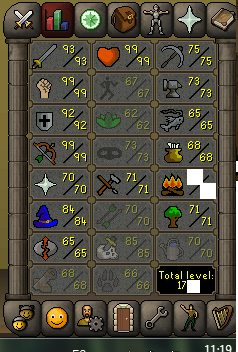 Hey, im looking for a few OSRS mills, pls lmk, ill buy from the best offer thanks. PM or quotePm'edstill avialablerestockedPlease check private messagesAdded to discordstock still availablebump!BumpCheck Skype plsbumpobumpopm'ed



Account
Navigation
Search
Configure browser push notifications
Chrome (Android)
- Tap the lock icon next to the address bar.
- Tap Permissions → Notifications.
- Adjust your preference.
Chrome (Desktop)
- Click the padlock icon in the address bar.
- Select Site settings.
- Find Notifications and adjust your preference.
Safari (iOS 16.4+)
- Ensure the site is installed via Add to Home Screen.
- Open Settings App → Notifications.
- Find your app name and adjust your preference.
Safari (macOS)
- Go to Safari → Preferences.
- Click the Websites tab.
- Select Notifications in the sidebar.
- Find this website and adjust your preference.
Edge (Android)
- Tap the lock icon next to the address bar.
- Tap Permissions.
- Find Notifications and adjust your preference.
Edge (Desktop)
- Click the padlock icon in the address bar.
- Click Permissions for this site.
- Find Notifications and adjust your preference.
Firefox (Android)
- Go to Settings → Site permissions.
- Tap Notifications.
- Find this site in the list and adjust your preference.
Firefox (Desktop)
- Open Firefox Settings.
- Search for Notifications.
- Find this site in the list and adjust your preference.