Jump to content
View in the app

A better way to browse. Learn more.

OSBot :: 2007 OSRS Botting

A full-screen app on your home screen with push notifications, badges and more.

To install this app on iOS and iPadOS
  1. Tap the Share icon in Safari
  2. Scroll the menu and tap Add to Home Screen.
  3. Tap Add in the top-right corner.
To install this app on Android
  1. Tap the 3-dot menu (⋮) in the top-right corner of the browser.
  2. Tap Add to Home screen or Install app.
  3. Confirm by tapping Install.

Deviant

Trade With Caution
  • Joined

  • Last visited

Everything posted by Deviant

  1. Hey man can i get a test of this script? Love your mage script by the way thanks
  2. @tixum lol you faggot ...
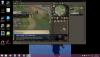
  3. Awesome script man... 16 hours in, look at the gains/
  4. Bot eats all the food now... just sits there and eats all food till out ... ?
  5. Hey I'm at rockcrabs with my pure and everything is fine but when it goes to bank it throws cammy tele tabs in bank? I'm not sure whats wrong?

Account

Navigation

Search

Configure browser push notifications

Chrome (Android)
  1. Tap the lock icon next to the address bar.
  2. Tap Permissions → Notifications.
  3. Adjust your preference.
Chrome (Desktop)
  1. Click the padlock icon in the address bar.
  2. Select Site settings.
  3. Find Notifications and adjust your preference.