tattyfart
Members
-
Joined
-
Last visited
Everything posted by tattyfart
-
thank you for the quick response! I forgot about the logger! it was stopping due to something with the break timer, something between the nmz bot break timer and the actual settings of osbot break timer might have been interfering with eachother. nonetheless i have got my bot working, so much appreciated and keep up the great work!!
-
worked fine for me for months on and off. now tried to re use the script and it does not recognize being in nmz if put in manually. the bot runs to the vial and exits the dream. i am a strong beleiver in starting the nmz manually clicking and letting the bot take over. any insight towards this issue would be great!
-
when the v1.30 comes out. may i try a trial please?
-
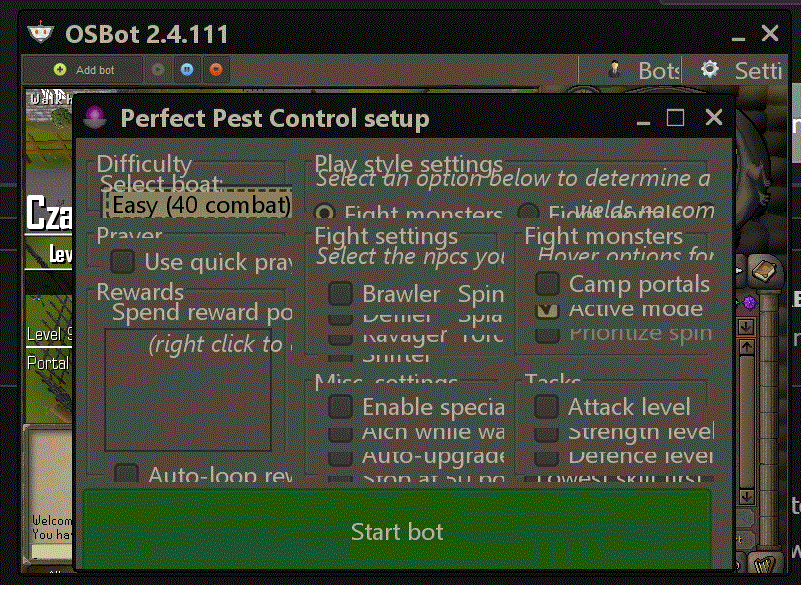
Hello; I have just recently purchased the script and when i run the script the "Perfect Pest Control Setup" window is very squished. The font is all smashed together. I run a 4k monitor on 3840x2160 resolution and osbot runs a very small window. So ive tried going to a smaller screen resolution and although osbot becomes bigger in size, the "perfect pest control setup" window still has all of the font and options overlapping itself. If you understand what i mean and have any suggestions that would be much appreciated!