Jump to content
View in the app

A better way to browse. Learn more.

OSBot :: 2007 OSRS Botting

A full-screen app on your home screen with push notifications, badges and more.

To install this app on iOS and iPadOS
  1. Tap the Share icon in Safari
  2. Scroll the menu and tap Add to Home Screen.
  3. Tap Add in the top-right corner.
To install this app on Android
  1. Tap the 3-dot menu (⋮) in the top-right corner of the browser.
  2. Tap Add to Home screen or Install app.
  3. Confirm by tapping Install.

yeeet

Members
  • Joined

  • Last visited

Everything posted by yeeet

  1. still for sale?
  2. yeeet replied to yeeet's topic in Accounts
    bump 30m offer
  3. yeeet replied to yeeet's topic in Accounts
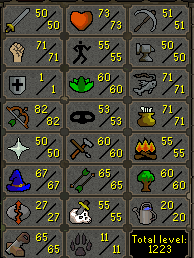
    got some more stats and 3 more qp with crystal saw and updated POH with altar and stamina pool looking for a bit more than 20m
  4. yeeet replied to yeeet's topic in Accounts
    sold
  5. yeeet replied to yeeet's topic in Accounts
    bump
  6. yeeet replied to yeeet's topic in Accounts
    bump
  7. yeeet replied to yeeet's topic in Accounts
    bump
  8. yeeet replied to yeeet's topic in Accounts
    bump
  9. yeeet replied to yeeet's topic in Accounts
    bump
  10. yeeet replied to yeeet's topic in Accounts
    bump
  11. yeeet replied to yeeet's topic in Accounts
    bump
  12. yeeet replied to yeeet's topic in Accounts
    bump
  13. yeeet replied to yeeet's topic in Accounts
    bump
  14. yeeet replied to yeeet's topic in Accounts
    bump
  15. yeeet posted a topic in Requests
    done thank you
  16. yeeet replied to yeeet's topic in Accounts
    bump
  17. yeeet replied to yeeet's topic in Accounts
    bump
  18. yeeet replied to yeeet's topic in Accounts
    bump
  19. yeeet replied to yeeet's topic in Accounts
    bump
  20. yeeet replied to yeeet's topic in Accounts
    bump
  21. yeeet replied to yeeet's topic in Accounts
    bump
  22. yeeet replied to yeeet's topic in Accounts
    bump
  23. yeeet posted a topic in Accounts
    gone.
  24. https://imgur.com/a/GhgnbNO- LMK what I can get, HMU with offers gonna put on sale soon

Account

Navigation

Search

Configure browser push notifications

Chrome (Android)
  1. Tap the lock icon next to the address bar.
  2. Tap Permissions → Notifications.
  3. Adjust your preference.
Chrome (Desktop)
  1. Click the padlock icon in the address bar.
  2. Select Site settings.
  3. Find Notifications and adjust your preference.