




Jump to content
View in the app

A better way to browse. Learn more.

OSBot :: 2007 OSRS Botting

A full-screen app on your home screen with push notifications, badges and more.

To install this app on iOS and iPadOS
  1. Tap the Share icon in Safari
  2. Scroll the menu and tap Add to Home Screen.
  3. Tap Add in the top-right corner.
To install this app on Android
  1. Tap the 3-dot menu (⋮) in the top-right corner of the browser.
  2. Tap Add to Home screen or Install app.
  3. Confirm by tapping Install.

matt_90x

Members
  • Joined

  • Last visited

Everything posted by matt_90x

  1. matt_90x replied to Czar's topic in Thieving
    This is a beautiful script man. Finished up the trial you gave me and 100% what I'm looking for. Just purchased it and can't wait to throw up some screenies
  2. matt_90x replied to Czar's topic in Thieving
    This script looks really nice tbh. Any chance of a trial please?
  3. matt_90x replied to Tom's topic in Fishing & Cooking
    I'd love a trial of this please
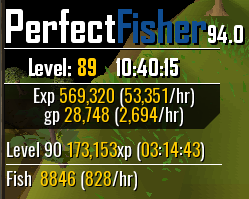
  4. Amazing script, saved many hours fishing so far!! One suggestion tho is, while barbarian fishing it will follow the spot way way across half the map to over side of the lake, even when there is a spot directly next to where the old one was (normal players would just click the closest spot, rather than walking all the way around the lake) But other than that this is amazing, here is a small proggie so far

Account

Navigation

Search

Configure browser push notifications

Chrome (Android)
  1. Tap the lock icon next to the address bar.
  2. Tap Permissions → Notifications.
  3. Adjust your preference.
Chrome (Desktop)
  1. Click the padlock icon in the address bar.
  2. Select Site settings.
  3. Find Notifications and adjust your preference.