




Jump to content
View in the app

A better way to browse. Learn more.

OSBot :: 2007 OSRS Botting

A full-screen app on your home screen with push notifications, badges and more.

To install this app on iOS and iPadOS
  1. Tap the Share icon in Safari
  2. Scroll the menu and tap Add to Home Screen.
  3. Tap Add in the top-right corner.
To install this app on Android
  1. Tap the 3-dot menu (⋮) in the top-right corner of the browser.
  2. Tap Add to Home screen or Install app.
  3. Confirm by tapping Install.

hoesaintloyal2

Members
  • Joined

  • Last visited

Everything posted by hoesaintloyal2

  1. hoesaintloyal2 replied to Fruity's topic in Minigames
    do you accept rsqp if so hm for this script
  2. OMFG TY been trying to fix this for weeks finally.....i figured i would ask
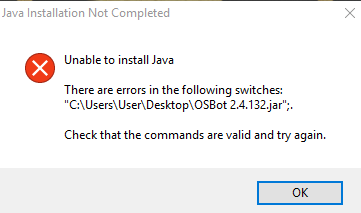
  3. i get this error when trying to open the bot
  4. hoesaintloyal2 replied to Token's topic in Others
    Trail please
  5. is it still possible to still get no overhead firecapes if so how much
  6. title says it all idc if it has def my main focus is 55 slayer looking for someone trusted
  7. yes when i check on the bot its not casting any spells or aggro to the npc i manually have to pause the script and click the npc it has done this to me alot lately ive seen other players have the same problem i think te anti ban timer is just a few mins to long
  8. got this scripted on Friday it ran fine at first now it stops attacking after awhile and just stands there while the monster is attacking i have the anti ban on is anyone else experiencing this problem

Account

Navigation

Search

Configure browser push notifications

Chrome (Android)
  1. Tap the lock icon next to the address bar.
  2. Tap Permissions → Notifications.
  3. Adjust your preference.
Chrome (Desktop)
  1. Click the padlock icon in the address bar.
  2. Select Site settings.
  3. Find Notifications and adjust your preference.