AnimalSeller
Members
-
Joined
-
Last visited
Everything posted by AnimalSeller
-
 I can do the hunter part if you're still looking for someone. I will beat everyone on price for the service. Add me on Skype if interested: Zycrest
 -
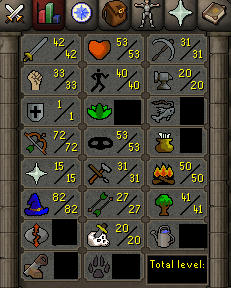
I have a def pure with 99 hunter. Add me on Skype if interested: Zycrest
-
Do you still need one? i have one.
-
I have a account with 99 hunter, no email/bans and never been botted.
-
If youre still looking i have a pure that has 850 PC points stored if you want it to be a voider and it also has a bunch of quests done.
-
Im looking to sell this acc if youre interested
-
Are you still looking for one? i got this acc Looking for 20m
-
i always alched onyx bolts (e).
-
I have never botted on these accounts, they have no emails/bans. Just trying to see what i can get for them. My Def pure isnt that amazing these are the stats, also has chin pet. The quests done on it are Lost city (for Puro Puro), Rune mysteries and Druidic Ritual. The quest done on this pure is Desert Treasure, Animal Magnetism, Dwarf Cannon, Horror from the Deep, and MM Requirements. Also has 850 Pest Control Points saved.
-
Just bought the script, running it now. Lets see how it does!