Jump to content
View in the app

A better way to browse. Learn more.

OSBot :: 2007 OSRS Botting

A full-screen app on your home screen with push notifications, badges and more.

To install this app on iOS and iPadOS
  1. Tap the Share icon in Safari
  2. Scroll the menu and tap Add to Home Screen.
  3. Tap Add in the top-right corner.
To install this app on Android
  1. Tap the 3-dot menu (⋮) in the top-right corner of the browser.
  2. Tap Add to Home screen or Install app.
  3. Confirm by tapping Install.

deValois

Members
  • Joined

  • Last visited

Everything posted by deValois

  1. deValois replied to Khaleesi's topic in Agility
    The script is having difficulty in identifying the beginning of seers course hovering too much with the mouse taking about 30 seconds to find it..Please fix this
  2. deValois posted a topic in Price Check
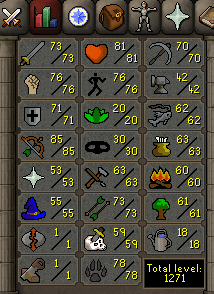
    This acc has a 2 days ban offense,full void,fighter torso and Golem pet
  3. deValois posted a topic in Price Check
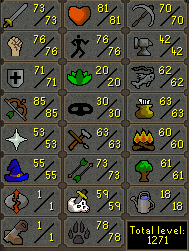
    The acc has rock golem pet,full void and figher torso Also theres a 2 days ban offense
  4. Can I get a trial?
  5. deValois replied to Czar's topic in Thieving
    Can I have trial? Thanks ^_^
  6. Can I have a trial as well?
  7. Can I have a trial?
  8. deValois replied to deValois's topic in Botting & Bans
    and if I want to create a new account and jagex won't track me again what should I do?
  9. deValois posted a topic in Botting & Bans
    Do 2 days ban are lifted after 1 year of no rule breaking?
  10. deValois replied to Khaleesi's topic in Agility
    This error is present in all courses or only canfis and below? any estimated time till fixing this error?
  11. deValois replied to Khaleesi's topic in Agility
    There is something wrong with the script at Alkharid and Draynor they reach a certain point in the course and the script is unable to click the point where he continues the rest of the course also at that point the script moves the mouse around that point in a weird way..

Account

Navigation

Search

Configure browser push notifications

Chrome (Android)
  1. Tap the lock icon next to the address bar.
  2. Tap Permissions → Notifications.
  3. Adjust your preference.
Chrome (Desktop)
  1. Click the padlock icon in the address bar.
  2. Select Site settings.
  3. Find Notifications and adjust your preference.