






Explv
Scripter II
-
Joined
-
Last visited
Everything posted by Explv
-
Easiest way imo is just to do a long sleep, and check if you still have gold bars / have leveled up: if(getKeyboard().typeString("27")){ new ConditionalSleep(100_000){ @Override public boolean condition() throws InterruptedException { return !getInventory().contains("Gold bar") || getDialouges().isPendingContinuation(); } }.sleep(); }
-
Step 1) Go to settings -> options -> debug -> tick Widgets Step 2) Hover your mouse over the part of the screen you want to be able to interact with using widgets In this case, the mouse is hovering over the skills tab. You can see three rectangles. Green, red and white. For each of these rectangles, the corresponding widget ids can be seen on the left. The top most id is the parent id, below that is the child id. For some widgets there may be three ids, the third is just a child of the second id. In this case we want to get the widget for the green rectangle, so in code this would be: RS2Widget skillTab = getWidgets().get(548, 53); When accessing widgets, if a widget is not on screen it will be null, so always make sure to null check your widgets. You can now interact with this widget for example: private void openSkillTab(){ RS2Widget skillTab = getWidgets().get(548, 53); if(skillTab != null) skillTab.interact(); } If you are ever trying to interact with a widget that has text in it, just find the widget using the text, this is a more reliable solution, for example: RS2Widget troutWidget = getWidgets().getWidgetContainingText("Raw trout");
-
Note: the text must be exact (case as well). It is "Cook All" not "Cook all" It is also better practice to find widgets using text when you can: RS2Widget troutWidget = getWidgets().getWidgetContainingText("Raw trout"); if(troutWidget != null) troutWidget.interact("Cook All");
-
If you are simply walking to a location you can just do: getWalking().webWalk(position); Also, the creation of INodeRouteFinder is expensive, and should only be done once in a script, not every time you walk!! Create the route finder at the start of your script and store it. In the future when posting code to the Scripting Help section, please use the code tags, so that your code is properly formatted and coloured:
-
Alternatively you could just extend the ConditionalSleep class: import org.osbot.rs07.utility.ConditionalSleep; import java.util.function.BooleanSupplier; public final class FConditionalSleep extends ConditionalSleep { private final BooleanSupplier condition; public FConditionalSleep(final BooleanSupplier condition, int timeout) { super(timeout); this.condition = condition; } @Override public boolean condition() throws InterruptedException { return condition.getAsBoolean(); } } new FConditionalSleep(() -> myPlayer().isAnimating(), 5000).sleep();
-
-
If it really doesn't work then you could always try: getMouse().continualClick(...) // click and hold with release condition getMouse().move(...) // move to destination
-
lol
-
To stop people manipulating the mouse speed
-
...............
-
Make sure you are using the very latest version of Eclipse, the older ones do not support Java 8.
-
Pug's tutorial is cancer http://osbot.org/forum/topic/87697-explvs-dank-paint-tutorial/
-
I don't think so
-
No, I don't think so Why would you need to do that anyway?
-
private boolean playerIsInClanChat(String username){ username = username.replace('\u00A0', ' '); for(RS2Widget widget : S.getWidgets().getWidgets(589, 5)){ if(widget.getMessage().contains(username)) return true; } return false; }
-
No, the community edition has all the features you will need.
-
IntelliJ IDEA master race https://www.jetbrains.com/idea/
-
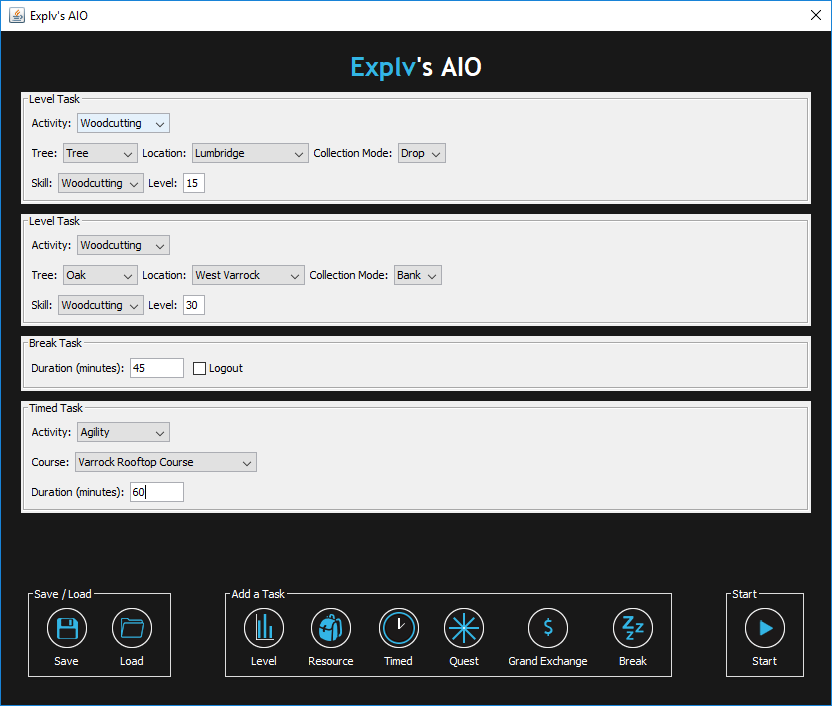
"Protecting this idea" ???? I have been working on this script since December, just because I made this thread today does not mean this is a new project. Don't be a haytause getName(), but you will also need to account for non breaking spaces in their name so use: if (hosts.contains(allPlayers.get(i).getName().replace('\u00A0', ' ')))Now open source: https://github.com/Explv/Explvs-AIO Download on GitHub: https://github.com/Explv/Explvs-AIO/releases/latest Explv's AIO From Tutorial Island to your dream account. Script ID: 890 CLI Usage: java -jar "OSBot 2.5.31.jar" -login osbot_user:osbot_passwd -bot osrs_user:osrs_passwd:pin -script "\"Explv's AIO v3.2\":example.config" Advanced task system featuring 7 different task types Level task: Perform an activity until a level in a skill is reached Resource task: Perform an activity until a quantity of an item has been obtained Timed task: Perform an activity for a number of minutes Quest task: Complete a quest Grand Exchange task: Buy or sell items at the Grand Exchange Break task: Pause the script for an amount of time Loop task: Repeat selected previous tasks any number of times Tutorial Island Support The script completes Tutorial Island if your player starts there, with fully randomized customer character creation GUI Preview Supported Activites Agility Cooking Crafting Firemaking Fishing Fletching Herblore Mining Ranged Runecrafting Smithing Thieving Woodcutting Quests


 I have confirmed getStore.isOpen() 100% works at Jiminua's store. Also using an area, when checking for the closest "Jiminua" is unnecessary, there is only one Jiminua, and if she leaves the area you have specified it will return null. The issue lies elsewhere in your code. Item ID 7936 is Pure essence: https://rsbuddy.com/exchange?id=7936& If the shop does not have 100 Pure essence, your script will not do anything. For clarity you should use Strings instead of IDs for item names. public void buyPureEssence(){ if(!S.getStore().isOpen()){ openStore(); } else if(S.getStore().contains("Pure essence"){ buy10(); } } private void buy10(){ long invPureEssAmount = S.getInventory().getAmount("Pure essence"); S.getStore().interact("Buy 10", "Pure essence"); new ConditionalSleep(2000) { @Override public boolean condition() throws InterruptedException { return S.getInventory().getAmount("Pure essence") > invPureEssAmount; } }.sleep(); } private void openStore(){ NPC shopkeeper = S.npcs.closest("Jiminua"); if(shopkeeper != null){ shopkeeper.interact("Trade"); new ConditionalSleep(5000) { @Override public boolean condition() throws InterruptedException { return S.getStore().isOpen(); } }.sleep(); } }http://www.tutorialspoint.com/swing/swing_jtextfield.htmUnfortunately that would be a bug in the Web Walker and not my script.Try Player player = players.closest("Stone 688ab");




