






merch2bank
Members
-
Joined
-
Last visited
-
yes the normal clent closes out als
-
its perfect fisher
-
so I watched my bot get loged out and logged in and it just sits there and does nothing, the bot crashes or something then it eventually closes out please read logger below
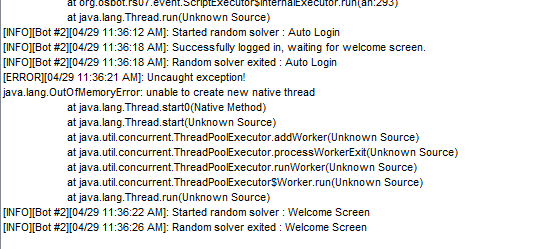
-
my bot and runescape clients close out after a while randomly whats my issue with this????????
-
# A fatal error has been detected by the Java Runtime Environment: # # EXCEPTION_ACCESS_VIOLATION (0xc0000005) at pc=0x5f257afe, pid=15308, tid=0x00000698 # # JRE version: Java(TM) SE Runtime Environment (8.0_201-b09) (build 1.8.0_201-b09) # Java VM: Java HotSpot(TM) Client VM (25.201-b09 mixed mode windows-x86 ) # Problematic frame: # C [rrwq5914782902496422376.dll+0x17afe] # # Failed to write core dump. Minidumps are not enabled by default on client versions of Windows # # If you would like to submit a bug report, please visit: # http://bugreport.java.com/bugreport/crash.jsp # The crash happened outside the Java Virtual Machine in native code. # See problematic frame for where to report the bug. that happened the 21st not last night, was the only one I could find
-
how do I kow or find out? and no im not seeing any
-
everynight ill set up mu osbot and runescpaes on mirror, ill go to bed and wake up and there is nothing , why does everything keep closing . please help

