waddy420
Trade With Caution
-
Joined
-
Last visited
-
I am looking to sell the accounts but i want good prices
-
10,5m bid mehehe
-
Keep 15 prayer for staking levels and this wouldn't be a bad account someone will most likely want
-
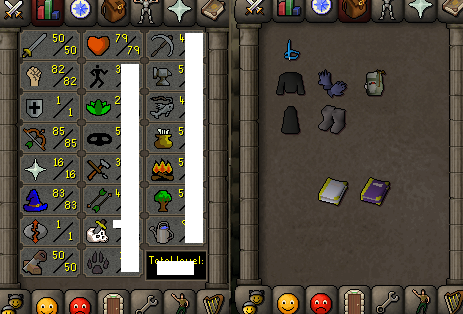
Both accounts have never been botted. Pure is perfectly quested (16 prayer to some pkers is eh however it is a good build) Main has 186 quest points (message me if you want to purchase i can make a thread on the for sale section with appropriate pictures to go with!)
-
ill go for 9m
-
i have a pure with 50 attack 76 strength 1 defence 1 prayer 81 range and 81 mage, has mith gloves 100+ bh kills pm me
-
How do you actually get the TRIAL?
-
No need for this account as my friend has given me his account. 5M Start
-
-
Will pay your price if it's not too much. 72 Range, 13 Defence and 72 hp. If you want i can buy the supplies. Send me a message on here, would like it to be done today if possible!
-
same problem here
-
you can sure type some words and make them rhyme im sick off rappers talking nonsense all the time i think you need chill out with the aggressiveness, doesn't do good to ones mind you mention words repeatedly try to refrain from doing so take a deep breath and write something good to show
-
deal pm me i can't send a new one
-
-
i can do it for you can't pm you as of yet need to wait half an hour