





Jump to content
View in the app

A better way to browse. Learn more.

OSBot :: 2007 OSRS Botting

A full-screen app on your home screen with push notifications, badges and more.

To install this app on iOS and iPadOS
  1. Tap the Share icon in Safari
  2. Scroll the menu and tap Add to Home Screen.
  3. Tap Add in the top-right corner.
To install this app on Android
  1. Tap the 3-dot menu (⋮) in the top-right corner of the browser.
  2. Tap Add to Home screen or Install app.
  3. Confirm by tapping Install.

progamerz

Scripter II
  • Joined

  • Last visited

Everything posted by progamerz

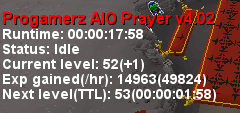
  1. Are you sure this is my script? It isn't supposed to use edge at all EDIT: pushed v4.02 which might fix it, it can be an issue due to high latency when world hopping and it doesn't detect it is in wilderness
  2. I'll check it, an update could've changed something will let you know
  3. What exactly is broken?
  4. Gave 3 hours trial because you already got one previously, enjoy
  5. Sorry for the late reply, activated
  6. That's weird, did you just keep restarting for it to work or did you change something?
  7. Pushed fix v1.13 which should fix the issue with interactions, allow up to 24 hours to propagate on the sdn
  8. Are you using fixed client mode? what does it show in logger?
  9. Authed, enjoy🙂
  10. I will be checking it out, thanks for reporting For the time being start with coins EDIT: pushed v4.61, allow up to 24 hours to be live on the sdn
  11. Pushed fix v0.241 Please allow up to 24 hours to be live on sdn
  12. Which part of it is broken? It doesn't deposit it in the crucible?
  13. It does help only in the minigame stages
  14. Pushed update v0.24 which adds worldhoping functionality to the script with 2 modes available, player count and minutes since last worldhop. Updated the cli tutorial as well. Allow up to 24 hours for the update to be live
  15. Great to hear! As for the suggestions: - By dunk do you mean the right click option which usually cools/heats faster? - Added to the todo list - Added to the todo list - I might consider this in the future, it is a low priority for now

Account

Navigation

Search

Configure browser push notifications

Chrome (Android)
  1. Tap the lock icon next to the address bar.
  2. Tap Permissions → Notifications.
  3. Adjust your preference.
Chrome (Desktop)
  1. Click the padlock icon in the address bar.
  2. Select Site settings.
  3. Find Notifications and adjust your preference.
