






dtd
Members
-
Joined
-
Last visited
-
Bump
-
Bump
-
Bump
-
Bump
-
Bump
-
Bump
-
Bump
-
Bump
-
Bump
-
Bump
-
Bump
-
Bump
-
Bump
-
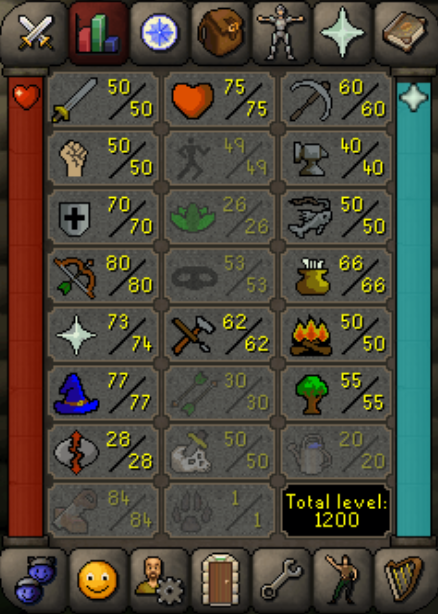
Hey guys, I am selling my med level starter as I've decided to make a pure instead https://gyazo.com/5bece0ef021e446802cc334423bcc65d Gear: https://gyazo.com/0744dd0d1351ab39fe3f29b9707ae2f5 Account Status: https://gyazo.com/0135ab5284fe4b0214e32b70717aaa4f Quests: https://gyazo.com/c1cb6d566a924dac2497251a745db5e1 Starting Price: 100m Auto-win: N/A Payment Method: OSRS GP is preferred but I am happy to sell through paypal if user is trusted. Trading Conditions: If user is trusted I am happy to go first, if not a middleman can be used. Original Owner: I originally bought the account as a starter of eldorado, the account was unregistered to an email upon time of purchase. Majority of items and stats have been done by me aside from a chunk of the questing. Further details can be provided if this is a concern.
-

