





Leaderboard

Popular Content
Showing content with the highest reputation on 02/16/25 in all areas
-
can i have trial to revenants?1 point
-
1 point
-
Worked great as expected. However i lost 3 of the 5 accounts. The 3 were at red chins and other 2 were elsewhere. Id assume its cause theres only one selectable spot in feldip hills. They had no bans and a few weeks playtime and been resting 2 weeks till i bonded them yesterday to test the script. But the script worked flawlessly other than that. Mabey make 2 or 3 of the spots in Feldip Hills available?1 point
-
1 point
-
Trial for the hunter please sir!1 point
-
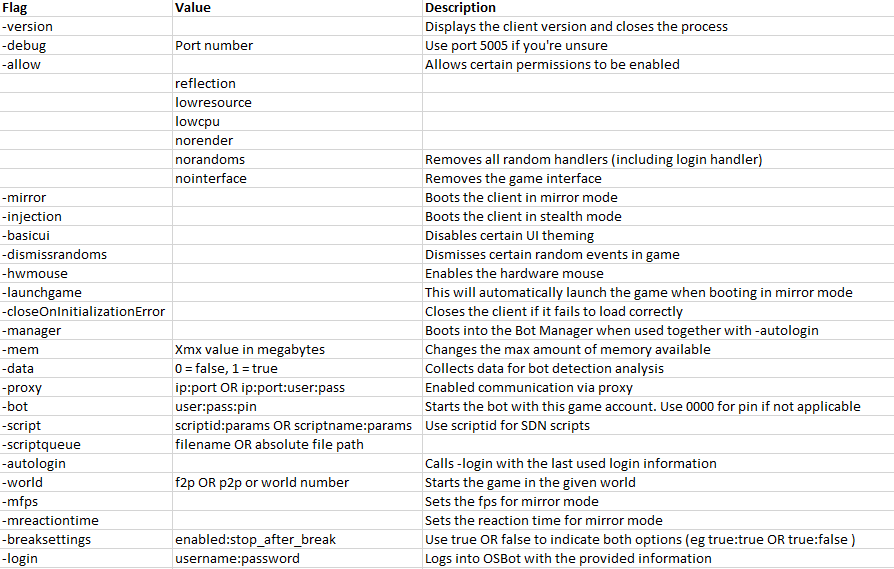
1 pointTo start OSBot through command-line, open up terminal/cmd on your operating system. Ensure your working directory in command-line is at the location where your OSBot jar is located. For instance if you are on Windows and the jar is on your Desktop, then you must type "cd Desktop" first. For instance: If you are looking to only start OSBot through command-line to see detailed output, please use the following snippet: java -jar "osbot 2.4.145.jar" -debug 5005 You must edit the information inside the quotes to what your jar file is named. If you are in the wrong directory or you typed in an incorrect filename, you will get an error: "Error: Unable to access jarfile osbot 2.4.145.jar".
 1 point


