PanosT
Members
-
Joined
-
Last visited
-
Ah, okay paint shows v0.28
-
There's an issue with banking the glory now, just a heads up. if works fine otherwise.
-
Yes, unfortunatly so. It banks perfectly fine if I watch it but instantly closing the bank seems to be the issue. edit: I made a gif of what happens i'll add your skype and send you the link because I can't upload it here.
-
No, here's all it says.

-
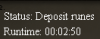
status: depositing runes it opens the bank, instantly closes it and then gets stuck without doing anything. edit: added a screenie of paint status.
-
Hey, this is prolly also a client issue but when nat running through the abyss and using glory tele it sometimes is unable to bank, just a heads up. It happens when depositing, it picks up glories just fine.
-
- Running abyss or normal altars? Abyss - What is your setup? (Food, teleport method, obstacles used, pouches used) Barely need to eat, i'm using glories mining agility and small and medium pouch It's really not that big of a bug but sometimes after doing natures the bot uses the amulet of glory twice to go back to edgeville Besides that it's worked really great and i have zero regrets buying it
-
-
Deffo a (free) nature rune crafter. a (free) chopper for yews/magics