






Loki874
Members
-
Joined
-
Last visited
-
Will try it thx
-
FIXED Looks like it was happening occasionally when the inventory tab wasn't available (like when the bank interface is open) if(tabs.getTabWidget(Tab.INVENTORY) != null && !Tab.INVENTORY.isDisabled(bot)) { inventory.getItem("Tuna").interact("Eat") }
-
Hi, I have the following piece of code: inventory.getItem("Tuna").interact("Eat") and sometimes the bot hangs up for a few seconds (looks like 7 seconds) and displays the following error into the logger: [ERROR][Bot #1][08/16 08:43:25 AM]: Inventory widget is null, trying to guess position. This is causing the bot to sometimes die as he does not eat on time. Any suggestions? EDIT: I could confirm there are still Tunas left in the inventory
-
Loki874 changed their profile photo
-
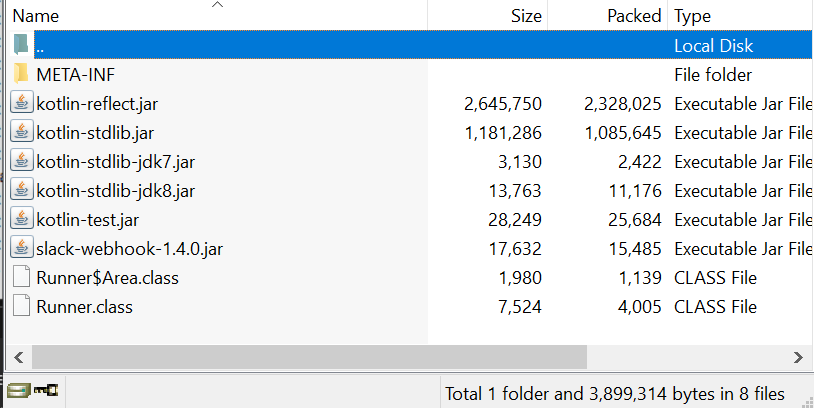
Ok managed to get it to work. For future reference, in the archive you have to extract the kotlin library jar contents into it as Osbot won't be able to read library stuff from a jar
-
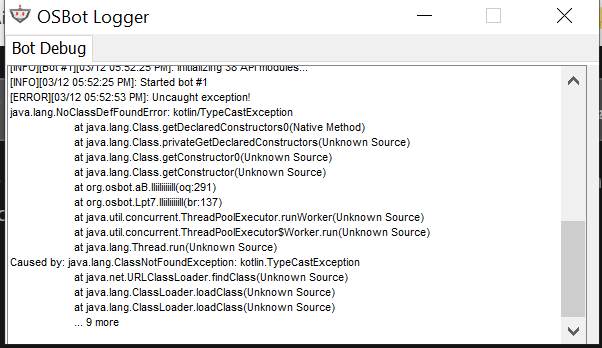
Hey guys, starting out a new project and since Kotlin is much nicer than Java I thought the next script would be kotlin based. However I keep getting java.lang.NoClassDefFoundError: kotlin/TypeCastException error. Anyone met with this problem before? I have added the Kotlin lib to the jar output directory.
-
So I was babysitting my account where I noticed that the client was randomly logged off (not break manager), the bot automatically logged back in and after 2 seconds it was logged out again saying there is a 2 day ban, this is a private custom script for Giant Spiders I wrote that has been running flawless for a month. I have the bot notifying me when there are other players around or if someone talks, there was nothing. Was this a physical ban? And what's up with the weird log out before issuing the ban? below are the logs [INFO][Bot #1][08/28 12:16:52 PM]: Time to 69 ATTACK: 00:48:19 [INFO][Bot #1][08/28 12:16:58 PM]: Attacking [INFO][Bot #1][08/28 12:17:06 PM]: eating food at 33 [INFO][Bot #1][08/28 12:17:24 PM]: Attacking [INFO][Bot #1][08/28 12:17:44 PM]: Attacking (randomly logged off??) [INFO][Bot #1][08/28 12:18:07 PM]: Started random solver : Auto Login [INFO][Bot #1][08/28 12:18:11 PM]: Successfully logged in, waiting for welcome screen. [INFO][Bot #1][08/28 12:18:11 PM]: Random solver exited : Auto Login [INFO][Bot #1][08/28 12:18:12 PM]: Attacking (banned after 2 seconds of logging back in) [INFO][Bot #1][08/28 12:18:14 PM]: Started random solver : Auto Login EDIT: I have also noticed that the Auto login exited and the script immediately started ([INFO][Bot #1][08/28 12:18:12 PM]: Attacking ), isn't the welcome screen manager supposed to come in? Did the script manage to click attack on the npc while the welcome screen was showing, hence the 2 second insta ban?
-
So what really effects the banning with free scripts? Is it how they are made or is it because a lot of people use it ?



