notagod
Members
-
Joined
-
Last visited
Everything posted by notagod
-
This picks them up right? i dont wanna be running it all the time if it doesnt pick up shit lol
-
masks still spawn? so much for being rare if you have 19 masks...they should limit people 1 per person for that week -.-
-
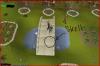
yes im totally mad. for those still curious this is where i found my skele costume and for the mask i was up stairs in the furnace house. on the white mat.. im not greedy i dont ask for gp to give obvious locations. i also have the mask set and the syth. i got those before i knew about this bot.
-
Or you can not be a greedy fuck and see that not one fuck was given about your finds.
-
i found jack o lantern in fally 2nd floor furnace i just watch the bot while watching tv when it says it finds something i turn off the bot now im looking for the skeleton, any specific place thats at orrrr? just random again
-
thats the thing it doesn't pick up jack-o-lantern mask. i saw it say it found it so i stopped the bot and picked it up now im looking for skeleton stuff
-
it doesnt pick them up... said mask found world 378 and i look in inve and i see nothingng i would have had 3 masks -.- please update to pick them up..
-
once randoms are supported. contact me. other then that no point in botting anything
-
That developers only log in lol