




Jump to content
View in the app

A better way to browse. Learn more.

OSBot :: 2007 OSRS Botting

A full-screen app on your home screen with push notifications, badges and more.

To install this app on iOS and iPadOS
  1. Tap the Share icon in Safari
  2. Scroll the menu and tap Add to Home Screen.
  3. Tap Add in the top-right corner.
To install this app on Android
  1. Tap the 3-dot menu (⋮) in the top-right corner of the browser.
  2. Tap Add to Home screen or Install app.
  3. Confirm by tapping Install.

freetheanimals22

Members
  • Joined

  • Last visited

Everything posted by freetheanimals22

  1. I have a picture of the spot where it breaks attached. It seems to be stuck on camera rotation and unable to progress forward. Zooming out further had no effect, which I also have a picture of me doing at max zoom (If you want it). Also a tad bit nit picking here but since this course is fairly short I noticed it seemed to like to click on the mini map to go to places during the one or two laps it worked which seems kind of odd considering how short this course is but I have no knowledge of why it does that just kinda curious since it's a small course. Thanks for the quick reply!
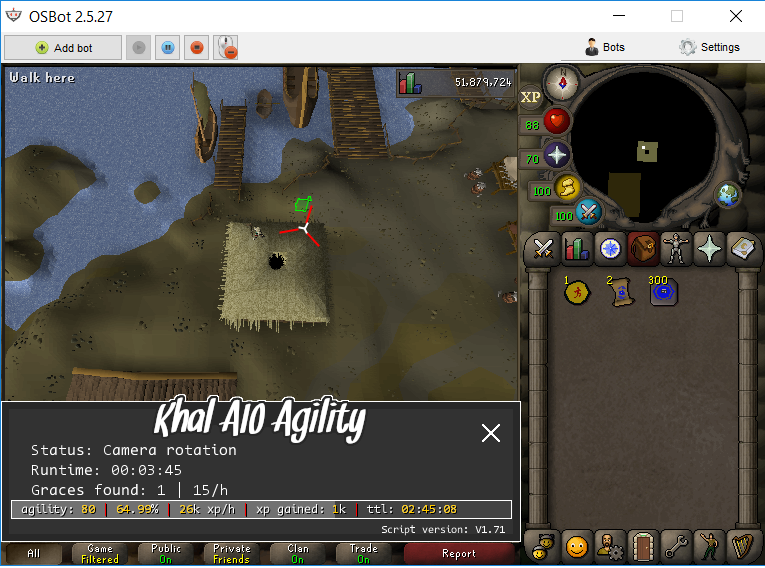
  2. The Rellekka rooftop course will often break on the first roof top and be unable to progress. Other than that so far it works pretty good.

Account

Navigation

Search

Configure browser push notifications

Chrome (Android)
  1. Tap the lock icon next to the address bar.
  2. Tap Permissions → Notifications.
  3. Adjust your preference.
Chrome (Desktop)
  1. Click the padlock icon in the address bar.
  2. Select Site settings.
  3. Find Notifications and adjust your preference.