ranqe0wnnz
Members
-
Joined
-
Last visited
-
Works perfectly now Thank you!
-
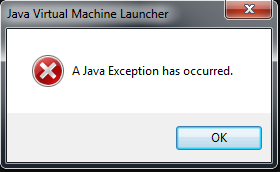
Hi guys, When I try to open the osbot 2.3.69 version, it won't open and then the following text appears: "A Java Exception has occured" (I have posted it as a picture aswell) Does any of you know what to do? Please help, Thank you Sincerly, Ranqe0wnnz
-
Can you max have 1 paid bot at a time ??? Cause I bought a new paid bot, and my old ankouskiller dissappeared - i'm not quite sure wether it was right after i paid for it or not, but well -any1 know anything about this??
-
-
Can anoyone find me a safe fighterbot? I don't care if it costs money or not! i just need it to be safe, and i know theres always a chance, but you know what i mean! stats. 73,88,70 so dont link me a druid killer
-
what u mean by jar ? i just wanna know if its safe to use or i will mosk likely get banned?
-
Can anoyone find me a safe fighterbot? I don't care if it costs money or not! i just need it to be safe, and i know theres always a chance, but you know what i mean! stats. 73,88,70 so dont link me a druid killer
-
Are all bots safe? just downloaded this: PseudoRockCrabs Can anyone tell me wether its safe or not ? thanks