Jump to content
View in the app

A better way to browse. Learn more.

OSBot :: 2007 OSRS Botting

A full-screen app on your home screen with push notifications, badges and more.

To install this app on iOS and iPadOS
  1. Tap the Share icon in Safari
  2. Scroll the menu and tap Add to Home Screen.
  3. Tap Add in the top-right corner.
To install this app on Android
  1. Tap the 3-dot menu (⋮) in the top-right corner of the browser.
  2. Tap Add to Home screen or Install app.
  3. Confirm by tapping Install.

richardcooper

Members
  • Joined

  • Last visited

  1. Sorry, OSBot is disabled for non VIP/Sponsor/Developers? Edit: .81 has just started working again for me lol. nvm Edit: now its not working -.- whats happening?
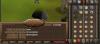
  2. 10 hr proggy, very very nice work
  3. I'd like this very much as iv never played rs3 and would like to try it out, just cba levelling my acc up as i play 07scape and dont wanna be paying mems on 2 accs, rs3 seems like wow to me which i like so id love to try it out
  4. Vouch , this guy is awsome I would reccomend to anyone, will definately be using again. Fast, reliable, keeps you upto date with what hes doing. 10/10
  5. 70 range, 60 def, 53 pray, 73 hp, send me an offer
Account

Navigation

Search

Configure browser push notifications

Chrome (Android)
  1. Tap the lock icon next to the address bar.
  2. Tap Permissions → Notifications.
  3. Adjust your preference.
Chrome (Desktop)
  1. Click the padlock icon in the address bar.
  2. Select Site settings.
  3. Find Notifications and adjust your preference.