




Jump to content
View in the app

A better way to browse. Learn more.

OSBot :: 2007 OSRS Botting

A full-screen app on your home screen with push notifications, badges and more.

To install this app on iOS and iPadOS
  1. Tap the Share icon in Safari
  2. Scroll the menu and tap Add to Home Screen.
  3. Tap Add in the top-right corner.
To install this app on Android
  1. Tap the 3-dot menu (⋮) in the top-right corner of the browser.
  2. Tap Add to Home screen or Install app.
  3. Confirm by tapping Install.

t0xic dem0n

Members
  • Joined

  • Last visited

Everything posted by t0xic dem0n

  1. yes sir lil cheeky 51hr proggy almost ive botted this account since right off island ive ran it non stop an havnt gotten any bans going for 99 thanks so much czar ur scrips are def the best!!! dont wait around thinking about it just get em an start the grind use accounts u dont care about if u wanna test them for bans ect
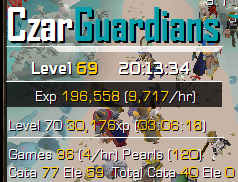
  2. another cheeky 20hr would be more but kiddos closed it down on me lmao still going strong thanks so much czar!!
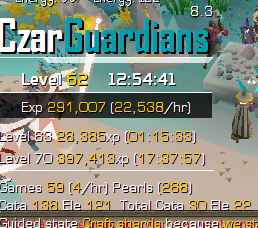
  3. a nice lil 13hr prog started from lvl1 got about 16hrs due to having to do sum stuff an stopped it lmao but running strong an works amazing thanks so much Czar!! dont think about it just go ahead an buy the script it is worth it i can promise u that it does everything an works amazing!!!
Account

Navigation

Search

Configure browser push notifications

Chrome (Android)
  1. Tap the lock icon next to the address bar.
  2. Tap Permissions → Notifications.
  3. Adjust your preference.
Chrome (Desktop)
  1. Click the padlock icon in the address bar.
  2. Select Site settings.
  3. Find Notifications and adjust your preference.