




Jump to content
View in the app

A better way to browse. Learn more.

OSBot :: 2007 OSRS Botting

A full-screen app on your home screen with push notifications, badges and more.

To install this app on iOS and iPadOS
  1. Tap the Share icon in Safari
  2. Scroll the menu and tap Add to Home Screen.
  3. Tap Add in the top-right corner.
To install this app on Android
  1. Tap the 3-dot menu (⋮) in the top-right corner of the browser.
  2. Tap Add to Home screen or Install app.
  3. Confirm by tapping Install.

freyll

Members
  • Joined

  • Last visited

Everything posted by freyll

  1. Like so? I've tried this many different ways, but whenever i start the bot, after patching, it tries to use a random bank pin
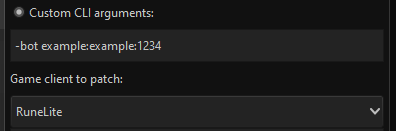
  2. Do i copy/paste this into the client patcher and replace the info with the bots info?
  3. It also looks like it's trying to open the Large, medium, and small pouches all at the same time after the first craft. which means the large pouch sometimes doesn't get fully emptied if the alter gives you too many variety of runes.
  4. @Khaleesi Not sure if this has been noted yet, but when doing ZMI, if you have all 4 pouches, when crafting at the altar, if you don't have 12 free spaces left to empty the giant pouch, the script doesn't re-empty the pouch and you end up teleporting with leftover essences in the giant pouch.

Account

Navigation

Search

Configure browser push notifications

Chrome (Android)
  1. Tap the lock icon next to the address bar.
  2. Tap Permissions → Notifications.
  3. Adjust your preference.
Chrome (Desktop)
  1. Click the padlock icon in the address bar.
  2. Select Site settings.
  3. Find Notifications and adjust your preference.