






Framble
Members
-
Joined
-
Last visited
Everything posted by Framble
-
bump
-
sfs
-
sfs
-
-
-
BUMP
-
Perfect alt to keep membership going in just 1 hour!
-
SFS!
-
Noted. SFS
-
sfs
-
sfs
-
sfs
-
sfs
-
sfs
-
sfs
-
.
-
sfs
-
sfs
-
Thanks for your comment but this do heavily depend on what clan chat you use to run! Normal rates are 3m for large pouch and 4m for giant pouch and if you are ranked you can get upwards to 5m/hr 4m/hr I would say is the minimum you would get as a giant runner . The rates are this high because you gain zero xp per hour, just money.
-
These accounts makes 4-5m/h in those zmi running cc's. But i would need all the gold at once im afraid.
-
BUMP
-
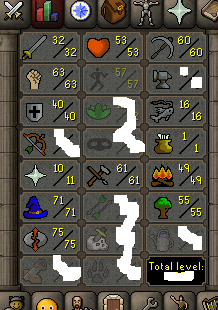
1. Pictures of the account stats 2. Pictures of the login details https://imgur.com/a/3VdYnyj 3. Pictures of the total wealth (if there is any) https://imgur.com/a/K8nmqN0 4. Pictures of the quests completed Lunars completed 5. The price you will be starting bids at 40m 6. The A/W (Auto-win) for your account Not set. 7. The methods of payment you are accepting: OSRS RSGP 8. Your trading conditions I do not take any responsibility for any locks/bans that happens after the account is handed over to you. 9. Pictures of the account status: No bans. (Can't show you screenshot because that would require me to register an email to this account. 10. Original/previous owners AND Original Email Address: No email set. Im OO.
-
Still looking, needs to be done by hand.
-
Need 200 marks of grace at 65 agility
-
I have one: https://imgur.com/a/PUrh9dM Comes with full gracefull, lunars done, rune pouch bought and hence 100% zmi altar ready.
-



