






Unclefester
Members
-
Joined
-
Last visited
-
It seems like the v4.521 update fixed the issue, it's banking just fine now.
-
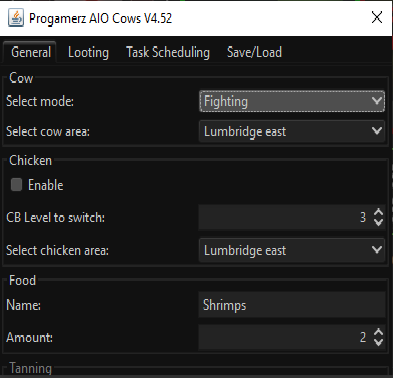
Had to use a new account, the old one got banned. So i let it start with 25 shrimps in inv to make it fill up faster. Once inv is full it idle's for a couple mins. [INFO][07/03 11:14:53 PM]: Welcome to OSBot 2.6.28! [INFO][07/03 11:14:54 PM]: Loaded 1 RS accounts! [INFO][07/03 11:14:54 PM]: Script list refreshed and loaded 4 scripts. [INFO][07/03 11:14:57 PM]: Updated injection hooks for client revision : 197! [DEBUG][Bot #1][07/03 11:14:57 PM]: Initializing stealth injection bot... [INFO][Bot #1][07/03 11:14:57 PM]: Downloading latest RS2 old-school client parameters... [INFO][Bot #1][07/03 11:14:58 PM]: Downloading latest RS2 old-school client... [DEBUG][Bot #1][07/03 11:15:00 PM]: Injected bot reference into client! [DEBUG][Bot #1][07/03 11:15:00 PM]: Injected world accessors! [DEBUG][Bot #1][07/03 11:15:00 PM]: Injected 38 class and 341 field accessors! [DEBUG][Bot #1][07/03 11:15:00 PM]: Injected canvas! [DEBUG][Bot #1][07/03 11:15:05 PM]: Loading RS world : 3122a [INFO][Bot #1][07/03 11:15:05 PM]: Initializing 39 API modules... [INFO][07/03 11:15:05 PM]: Started bot #1 [INFO][Bot #1][07/03 11:15:15 PM]: Loaded 4 built-in random solvers! [INFO][Bot #1][07/03 11:15:19 PM]: Started random solver : Auto Login [INFO][Bot #1][07/03 11:15:25 PM]: Successfully logged in, waiting for welcome screen. [INFO][Bot #1][07/03 11:15:45 PM]: Random solver exited : Auto Login [INFO][Bot #1][07/03 11:15:47 PM]: BreakManager: We will bot for 41 minute(s) and break for 5 minute(s) [INFO][Bot #1][07/03 11:15:53 PM]: Started random solver : Welcome Screen [INFO][Bot #1][07/03 11:15:57 PM]: Random solver exited : Welcome Screen [INFO][Bot #1][07/03 11:16:24 PM]: Started: InventoryObserver [INFO][Bot #1][07/03 11:16:24 PM]: Starting items: [Bronze sword, Wooden shield] [INFO][Bot #1][07/03 11:16:24 PM]: Random bury bones amount: 6 [INFO][Bot #1][07/03 11:16:24 PM]: We should open setting tab [INFO][Bot #1][07/03 11:16:31 PM]: Too many loops [INFO][Bot #1][07/03 11:17:03 PM]: [InventoryObserver] We aren't logged in!, continue [INFO][Bot #1][07/03 11:17:30 PM]: [InventoryObserver] We aren't logged in!, continue [INFO][Bot #1][07/03 11:17:37 PM]: WebWalkingEvent; We have reached the final destination!
-
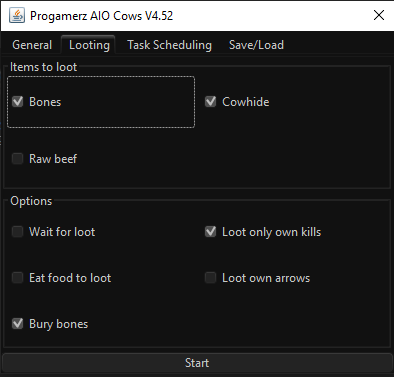
Just these. unless I set it to level a skill to a level.
-
How do you get this to put the cow hide in the bank? I just keep fighting even after full inventory.. Does it have no option to just bank the cow hide?


