







Malcolm
Global Moderator
-
Joined
-
Last visited
Everything posted by Malcolm
-
bump
-
BTC to $1,000,000
-
Not the greatest coin?
-
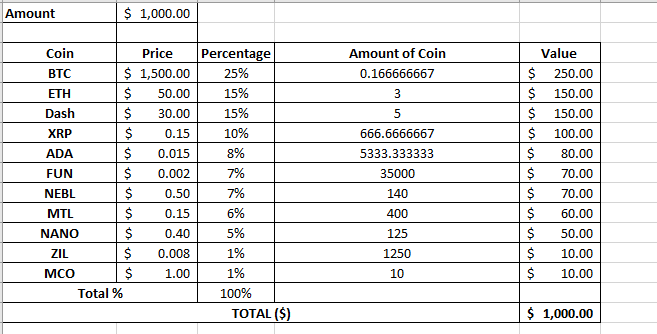
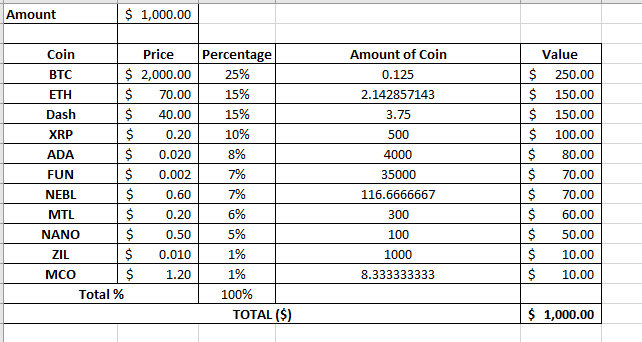
These are my price goals to get back in the market, somewhere in between these two prices. I made a little amount last year but not as much as I could have. I wasn't around for the big bull run of 2017. These are the coins I have picked out that I'd get at the specific prices if the price reaches my goals. I don't expect to reach all of these prices and yes, I am well aware that some of these are absolute dogshit coins. Anywho, any thoughts?
-
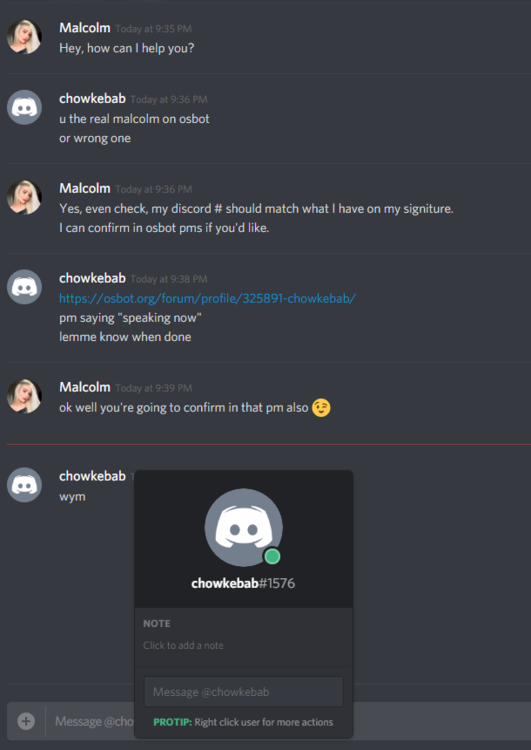
I don't have the guys actual OSBOT account so I cannot say who this is but supposedly trying to pose as somebody else. I am not too sure where this would go but in case this discord user is attempting to scam it is good to have common knowledge of the attempt. Not too sure why someone would want to pose as somebody with 1FB though.

-
bump
-
Done, enjoy 24hrs. I’ll look into including this
-
I could include a separate tab for progressive and I can get the users to pick their own areas from preset locations. What locations would you like to see and I can work on including this.
-
bump
-
bump
-
bump
-
bump
-
bump
-
bump
-
bump
-
bump
-
bump
-
bump
-
bump
-
I have pushed V1.11 to include a box that will hide/show paint located at the bottom right hand of the game screen (just above the paint). Credits to @T4TT03D for the suggestion!
-
bump
-
Both of these are done, you have 24 hours Enjoy. Sorry for the delay on this, I'll push that shortly.
-
bump
-
bump
-
bump




